el-table标签使符合条件的行高亮显示
AI 摘要salmon-ai
本文详
前言
现在需要做一个库存呢预警提示功能
代码
vue代码,主要是加上:row-class-name="tableRowClassName"
html
<el-table
      @sort-change="sortChange" v-loading="pageLoading" @row-click="handleRowClick" ref="elTable"
      :row-class-name="tableRowClassName"
      :data="pageResult.records" element-loading-text="正在查询中..." border fit highlight-current-row
      @selection-change="handleSelectionChange">
      <el-table-column type="selection" width="40"></el-table-column>
      <el-table-column align="center" label="ID" prop="id" :show-overflow-tooltip="true"/>
      <el-table-column align="center" label="商品名称" prop="name" :show-overflow-tooltip="true"/>
      <el-table-column align="center" label="商品主图" prop="mainImage" :show-overflow-tooltip="true">
        <template slot-scope="scope">
          <table-img :imgUrl="scope.row.mainImage"></table-img>
        </template>
      </el-table-column>
      <el-table-column align="center" label="商品单价" prop="price" :show-overflow-tooltip="true"/>
      <el-table-column align="center" label="库存" prop="store" :show-overflow-tooltip="true"/>
      <el-table-column align="center" label="类型" prop="type" :show-overflow-tooltip="true">
        <template slot-scope="scope">
          <el-tag :type="typeColorMap[scope.row.type]" size="small">{{ typeMap[scope.row.type] }}</el-tag>
        </template>
      </el-table-column>
      <el-table-column align="center" label="是否上架" prop="isShelf" :show-overflow-tooltip="true">
        <template slot-scope="scope">
          <el-tag :type="isShelfColorMap[scope.row.isShelf]" size="small">{{ isShelfMap[scope.row.isShelf] }}</el-tag>
        </template>
      </el-table-column>
      <el-table-column align="center" label="创建时间" prop="createTime" :show-overflow-tooltip="true"/>
      <el-table-column align="center" label="修改时间" prop="updateTime" :show-overflow-tooltip="true"/>
    </el-table>
    <!-- 分页 -->
    <pagination v-show="pageResult.total > 0" :total="pageResult.total" :pager-count="getPaperCount()"
                :layout="getLayout()" :page.sync="pageParam.pageNumber" :limit.sync="pageParam.pageSize"
@pagination="pageSearch"/>js代码
js
export default {
  name: 'AdLotteryProductPage',
  methods: {
    tableRowClassName({row, rowIndex}) {
      if (row.store < 10) {
        return 'row-row';
      }
      return '';
    },
}
css代码
css
.el-table .row-row {
  background-color: #f2fc45 !important;
}
效果
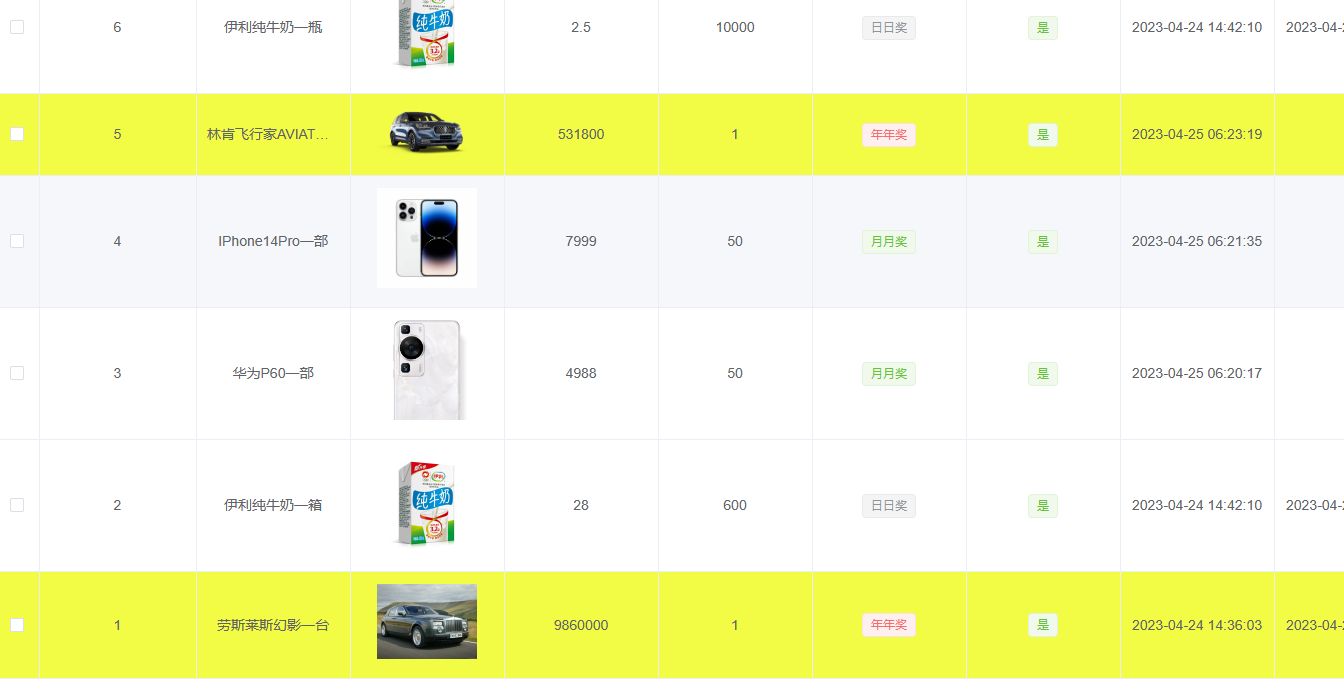
评论
0 条—
还没有评论,来说第一句