博客音乐播放器--网易云api
AI 摘要鱼粮不足,AI 今天先歇着 · 正文在下面
前言
最近想给博客增加个音乐播放器,于是了解了下市面的博客播放器都是网易云api,下面写上教程【注:本文是学习教程,并无任何盈利】
网易音乐api
我们可以访问网易云音乐(某大佬写的网易云音乐),查看每个你需要获取数据的请求,比如,我现在获取歌曲评论,如下
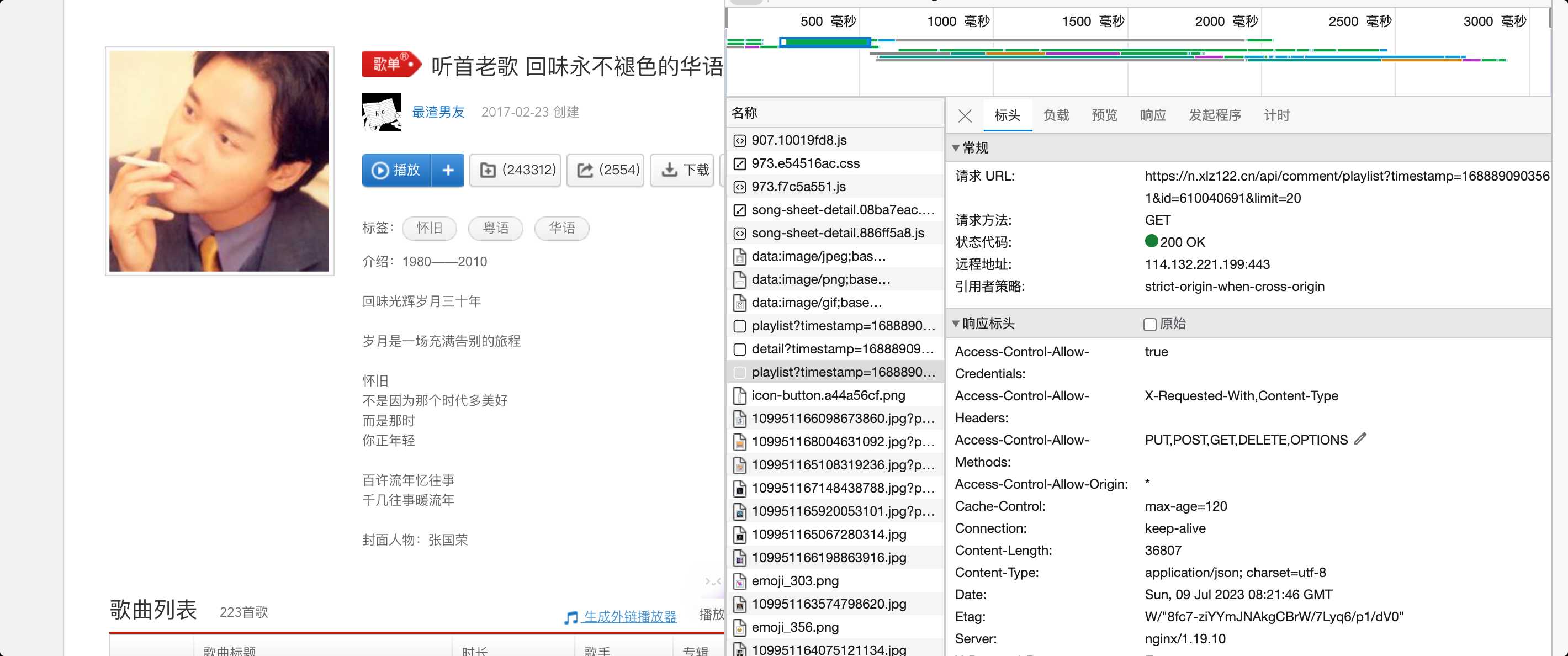
接口文档
| 接口名称 | 接口url | 参数 |
|---|---|---|
| 获取歌词 | https://n.xlz122.cn/api/lyric?id=xxx | 歌曲id |
| 获取歌曲详情 | https://n.xlz122.cn/api/song/detail?ids=xxx | 歌曲id |
| 获取歌曲url | https://n.xlz122.cn/api/song/url?id=xxx | 歌曲id |
| 获取热门歌曲 | https://n.xlz122.cn/api/playlist/detail?id=xxx | 歌曲id |
| 获取搜索建议 | https://n.xlz122.cn/api/search/suggest?keywords=xxx | 搜索关键字 |
| 获取歌曲热门评论 | https://n.xlz122.cn/api/comment/music?id=xxx&limit=xxx | 歌曲id、获取多少条评论 |
| 我们可以编写个music.js,用来封装这些接口 |
js
import axios from "axios";
//获取歌词
export const getWords = id => {
  return axios.post(`https://n.xlz122.cn/api/lyric?id=${id}`);
};
//获取歌曲详情
export const getMusicInfo = id => {
  return axios.post(`https://n.xlz122.cn/api/song/detail?ids=${id}`);
};
//获取歌曲url
export const getMusicUrl = id => {
  return axios.post(`https://n.xlz122.cn/api/song/url?id=${id}`);
};
//获取热门歌曲
export const getHotMusic = id => {
  return axios.post(`https://n.xlz122.cn/api/playlist/detail?id=${id}`);
};
//获取搜索建议
export const getSearchSuggest = key => {
  return axios.post(`https://n.xlz122.cn/api/search/suggest?keywords=${key}`);
};
//获取歌曲热门评论
export const getHotTalk = id => {
  return axios.post(`https://n.xlz122.cn/api/comment/music?id=${id}&limit=3`);
};反向代理配置
由于我后端接口的路径也是api前缀,故我本地反向代理需要对这些api做下处理,线上的话就用nginx做处理,下面是vue处理这些api的示例,防止代理到我本地后端服务器
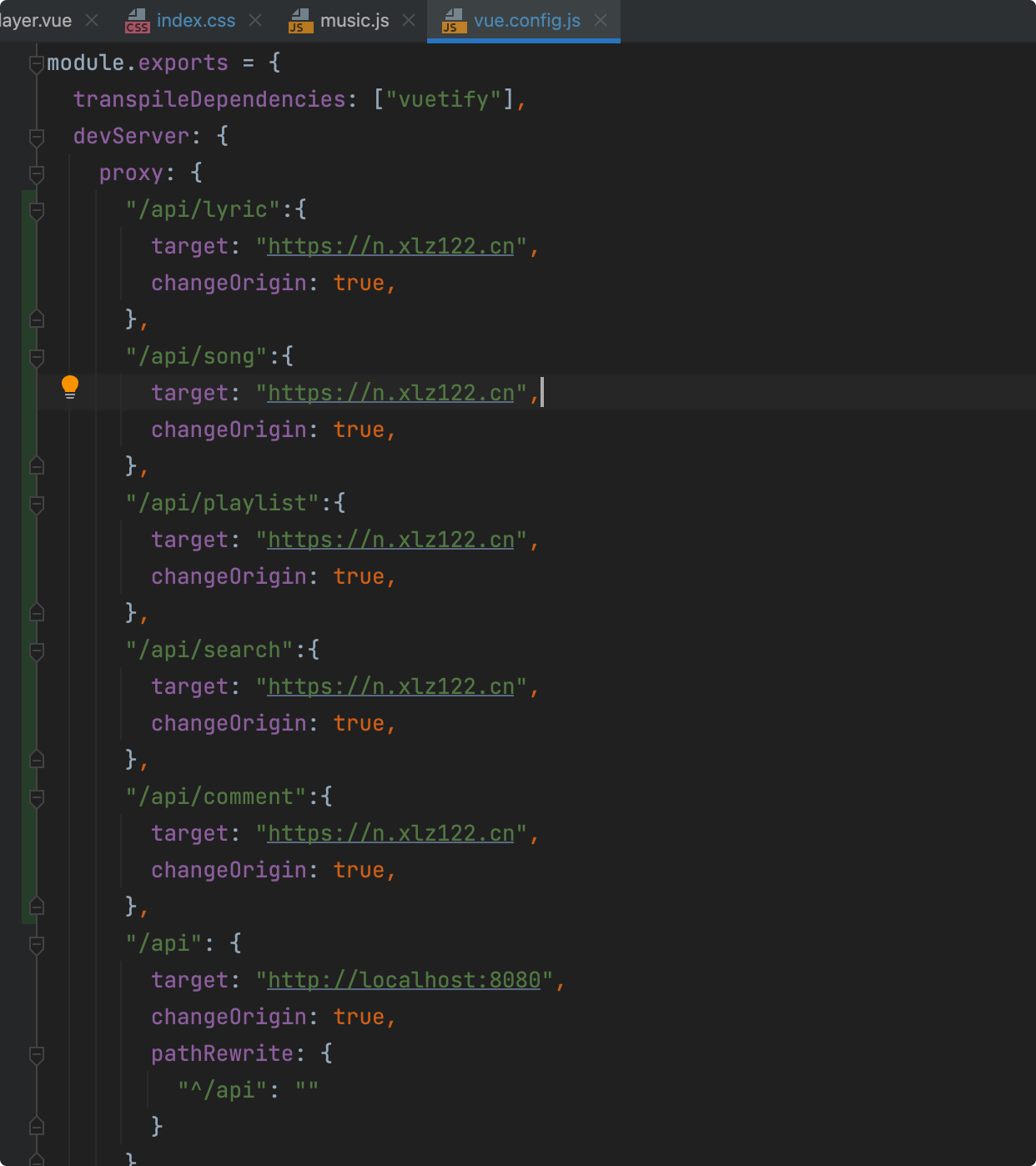
播放器页面
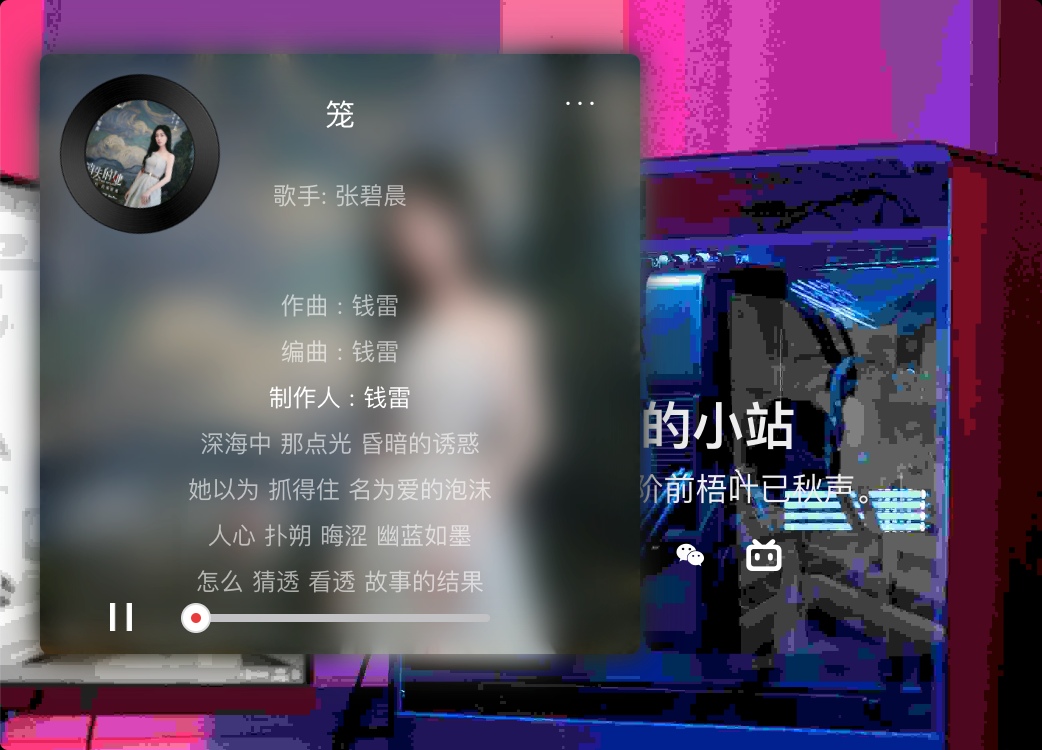
效果图
图片素材
添加到我的音乐(按钮是白色的,所以看不见正常)

音乐列表背景

音乐列表页中的音乐封面框
首页音乐封面的框
暂停按钮

播放按钮

单曲循环播放

列表顺序播放
评论双引号


列表页的播放按钮

播放器页面
播放器雏形样式
先写一个播放器封面的样式,隐藏与展开
html
<template>
  <div>
    <!-- 播放盒子 -->
    <div class="zbox" :class="{ zbox_active: disActive }">
      <div
          class="h_pan"
          :style="{ backgroundImage: 'url(' + pan + ')' }"
          :class="{ h_pan_active: disActive }"
          @click="DisActive">
        <img :src="musicImg" alt="" class="h_pan_c"/>
      </div>
      <div
          class="z_show_box"
          :style="{ backgroundImage: 'url(' + musicImg + ')' }"
          :class="{ z_show_box_active: disActive }"
          @dblclick="DisList">

      </div>
      <video
          id="music"
          autoplay="autoplay"
          :src="musicUrl"
          name="media"
      ></video>
    </div>
  </div>
</template>

<script>
import pan from "@/components/zw-player/img/pan.png";
import play from "@/components/zw-player/img/play.png";
import pause from "@/components/zw-player/img/pause.png";
import add from "@/components/zw-player/img/add.png";
import shlter from "@/components/zw-player/img/list_pan.png";
import listPlay from "@/components/zw-player/img/list_play_hover.png";
import state0 from "@/components/zw-player/img/state_0.png";
import state1 from "@/components/zw-player/img/state_1.png";
import talkicon1 from "@/components/zw-player/img/talkicon1.png";
import talkicon2 from "@/components/zw-player/img/talkicon2.png";

export default {
  name: "Player",

  data() {
    return {
      pan,
      play,
      pause,
      add,
      shlter,
      listPlay,
      state0,
      state1,
      talkicon1,
      talkicon2,
      musicUrl: "https://m801.music.126.net/20230709175854/a7af35dde0f68a315a2374f5a2a1c267/jdymusic/obj/wo3DlMOGwrbDjj7DisKw/28895067044/34d3/e9e3/898d/9a21a1e4304951c6ab3ffdc34a4fc01e.mp3",
      musicImg: "https://p1.music.126.net/XsTsiy7w_IAtqLIc6kMRAg==/109951168690739808.jpg?param=300y300",
      disActive: false,
      listIsDis: false,
    }
  },
  methods: {
    /*是否展开播放页*/
    DisActive() {
      this.disActive = !this.disActive;
    },
    /*是否展示音乐列表页*/
    DisList() {
      this.listIsDis = !this.listIsDis;
    },
  }
}
</script>

<style scoped>
@import url("./player.css");
</style>css样式
css
/*音乐盒子*/
.zbox {
    width: 100px;
    height: 100px;
    border-radius: 5px;
    position: fixed;
    z-index: 500;
    left: -40px;
    bottom: 10px;
    transition: all .5s;
}

/*播放盒子被点击时展开*/
.zbox_active {
    width: 300px;
    height: 300px;
    left: 20px;
    bottom: 320px;
}

/*播放盒子隐藏时的过渡动画*/
.zbox:hover:not(.zbox_active) {
    transform: translate(45px, 0);
}

/*音乐封面*/
.h_pan {
    width: 100px;
    height: 100px;
    background-size: 100% 100%;
    position: absolute;
    left: 0px;
    top: 0px;
    padding: 16px;
    /*顺时针旋转*/
    animation: h_pan 10s linear infinite;
    z-index: 103;
    transition: all .5s;
    cursor: pointer;
    border-radius: 100%;
}

/*x动画*/
@keyframes h_pan {
    0% {
        transform: rotate(0deg);
    }
    100% {
        transform: rotate(360deg);
    }
}

/*音乐封面被触摸时增加阴影*/
.h_pan:hover {
    box-shadow: 0px 0px 10px rgb(100, 100, 100);
    opacity: 1;
}

/*音乐封面图片大小*/
.h_pan_c {
    width: 100%;
    height: 100%;
    border-radius: 100%;
}

/*默认音乐播放页*/
.z_show_box {
    width: 100%;
    height: 100%;
    overflow: hidden;
    background-size: 100% 100%;
    border-radius: 5px;
    transition: all .5s;
    opacity: 0;
}

/*音乐封面被点击时,展开播放器页*/
.z_show_box_active {
    width: 100%;
    height: 100%;
    background-size: 100% 100%;
    border-radius: 5px;
    overflow: unset;
    /* older safari/Chrome browsers */
    -webkit-opacity: 1;
    /* Netscape and Older than Firefox 0.9 */
    -moz-opacity: 1;
    /* Safari 1.x (pre WebKit!) 老式khtml内核的Safari浏览器*/
    -khtml-opacity: 1;
    /* IE9 + etc...modern browsers */
    opacity: 1;
    /* IE 4-9 */
    filter: alpha(opacity=100);
    /*This works in IE 8 & 9 too*/
    -ms-filter: "progid:DXImageTransform.Microsoft.Alpha(Opacity=100)";
    /*IE4-IE9*/
    filter: progid:DXImageTransform.Microsoft.Alpha(Opacity=100);
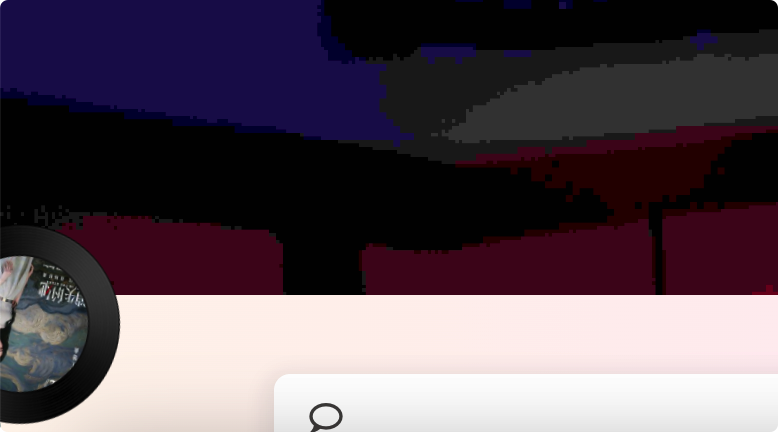
}隐藏于左下角
点击展开后
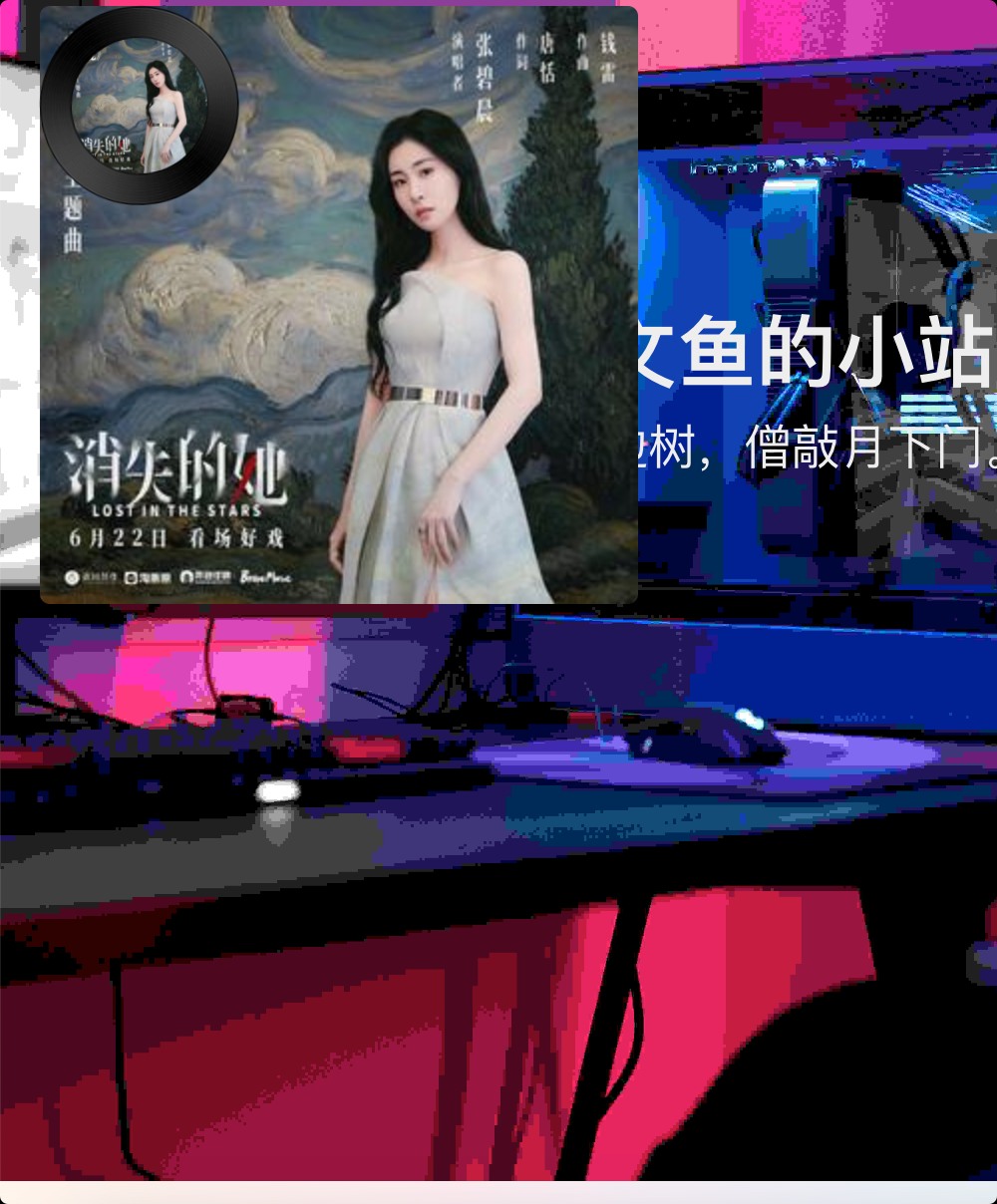
播放器完整样式
player.vue
html
<template>
  <div>
    <!-- 播放盒子 -->
    <div class="zbox" :class="{ zbox_active: disActive }">
      <!--  首页的音乐封面   -->
      <div class="h_pan"
           :style="{ backgroundImage: 'url(' + pan + ')' }"
           :class="{ h_pan_active: disActive }"
           @click="DisActive">
        <img :src="musicImg" alt="" class="h_pan_c"/>
      </div>
      <!-- 音乐播放器  -->
      <div class="z_show_box"
           :style="{ backgroundImage: 'url(' + musicImg + ')' }"
           :class="{ z_show_box_active: disActive }"
           @dblclick="DisList">
        <!-- 第一层模糊背景 -->
        <div
            class="z_music_shlter_2"
            :style="{ backgroundImage: 'url(' + musicImg + ')' }"
            :class="{ z_shlter_active: disActive }"
        ></div>
        <!-- 第二层模糊背景 -->
        <div
            class="z_music_shlter"
            :style="{ backgroundImage: 'url(' + musicImg + ')' }"
            :class="{ z_shlter_active: disActive }"
        ></div>
        <!--        <div class="z_music_shlter_3"></div>-->
        <!--  音乐信息 -->
        <div class="z_music_dis">
          <!--  音乐列表菜单按钮  -->
          <div class="z_dis_list" @click="DisList">···</div>
          <!--  音乐标题  -->
          <p class="z_music_title">{{ musicTitle }}</p>
          <!--  音乐歌手名称  -->
          <p class="z_music_singer">歌手: {{ musicName }}</p>
          <!--  歌词显示区域  -->
          <ul class="z_music_words">
            <!-- 实际歌词列表 -->
            <div class="music_words_box" :style="{ top: wordsTop + 'px' }">
              <!-- 每行歌词 -->
              <li v-for="(item, index) in musicWords"
                  :key="index"
                  class="z_music_word"
                  :class="{ z_word_highlight: wordIndex === index }">
                {{ item }}
              </li>
            </div>
          </ul>
        </div>
        <!--  音乐播放控制 -->
        <div class="z_control_box">
          <!-- 播放按钮 -->
          <div class="z_control_button">
            <img :src="playIcon" alt="" class="z_control_icon"/>
          </div>
          <!-- 进度条 -->
          <div class="z_progress">
            <div class="z_progress_c" :style="{ width: currentProgress }">
              <div class="z_progress_circle">
                <div class="z_progress_circle_c"></div>
              </div>
            </div>
          </div>
        </div>
      </div>
      <video
          id="music"
          autoplay="autoplay"
          :src="musicUrl"
          name="media"
      ></video>
    </div>
  </div>
</template>

<script>
import pan from "@/components/zw-player/img/pan.png";
import play from "@/components/zw-player/img/play.png";
import pause from "@/components/zw-player/img/pause.png";
import add from "@/components/zw-player/img/add.png";
import shlter from "@/components/zw-player/img/list_pan.png";
import listPlay from "@/components/zw-player/img/list_play_hover.png";
import state0 from "@/components/zw-player/img/state_0.png";
import state1 from "@/components/zw-player/img/state_1.png";
import talkicon1 from "@/components/zw-player/img/talkicon1.png";
import talkicon2 from "@/components/zw-player/img/talkicon2.png";
import $ from "jquery";

export default {
  name: "Player",

  data() {
    return {
      pan,
      play,
      pause,
      add,
      shlter,
      listPlay,
      state0,
      state1,
      talkicon1,
      talkicon2,
      playState: true, //播放状态,默认自动播放
      playIcon: pause, //暂停按钮
      musicUrl: "https://m801.music.126.net/20230709175854/a7af35dde0f68a315a2374f5a2a1c267/jdymusic/obj/wo3DlMOGwrbDjj7DisKw/28895067044/34d3/e9e3/898d/9a21a1e4304951c6ab3ffdc34a4fc01e.mp3",
      musicImg: "https://p1.music.126.net/XsTsiy7w_IAtqLIc6kMRAg==/109951168690739808.jpg?param=300y300",
      musicWords: [],//歌词
      wordsTime: [], //歌词时间
      musicTitle: "笼",//歌名
      musicName: "张碧晨",//歌手
      disActive: false,//是否展示播放器
      listIsDis: false,//是否展示播放列表
      wordsTop: 0,//歌词位置,歌词滚动时,将某行歌词的top给其
      wordIndex: 0,//当前所在行歌词
      currentProgress: "0%",//当前播放进度(进度条宽度)
    }
  },
  created() {
    let str = "[00:00.00] 作词 : 唐恬\n[00:01.00] 作曲 : 钱雷\n[00:02.00] 编曲 : 钱雷\n[00:03.00] 制作人 : 钱雷\n[00:33.10]深海中 那点光 昏暗的诱惑\n[00:40.94]她以为 抓得住 名为爱的泡沫\n[00:48.71]人心 扑朔 晦涩 幽蓝如墨\n[00:56.52]怎么 猜透 看透 故事的结果\n[01:01.66]\n[01:20.06]为何绚烂 叫人扑空\n[01:24.04]为何爱我者予我牢笼\n[01:28.07]为何等待 都徒劳无功\n[01:31.95]为何囚人者也像困兽(为什么)\n[01:36.79]越珍贵 越浪费\n[01:40.77]致命的伤 诞生于亲密\n[01:45.03]越追问 越无解\n[01:48.85]哪有答案 不过是咒语\n[01:54.39]都在笼中\n[01:57.46]\n[02:11.93]出口就 在身后 只需要回头\n[02:20.03]为什么 人们却 亲手上一把锁\n[02:27.71]不甘 不得 不休 囚人自囚\n[02:35.56]为爱 为爱 为爱 都只是为我\n[02:40.98]\n[02:47.33]为何绚烂 叫人扑空\n[02:50.90]为何爱我者予我牢笼\n[02:54.91]为何等待 都徒劳无功\n[02:58.84]为何囚人者也像困兽(为什么)\n[03:03.96]越珍贵 越浪费\n[03:07.97]致命的伤 诞生于亲密\n[03:11.99]越追问 越无解\n[03:15.83]答案写在笼中 只为困住你\n[03:24.72]\n[03:35.02]为何拥抱 那么疼痛\n[03:38.82]为何爱我者把我葬送\n[03:42.94]为何港湾 会变作迷宫\n[03:46.83]为何镜中人失去面孔(为什么)\n[03:51.96]越珍贵 越浪费\n[03:55.79]致命的伤 诞生于亲密\n[03:59.83]越追问 越无解\n[04:03.81]哪有答案 不过是咒语\n[04:09.08]爱不爱我\n[04:23.30]谁邀你入笼\n[04:32.99]\n[04:33.44] 配唱编写 : 钱雷@勇士音乐\n[04:33.90] 吉他 : 高飞@勇士音乐\n[04:34.36] 吉他录音 : 付威@Legend(来真的•北京)Recording Studio\n[04:34.81] 贝斯 : 赵浩成\n[04:35.27] Bass录音室 : SEDAR Studio\n[04:35.73] 和音 : 王笑文(丸子)\n[04:36.18] 弦乐编写 : 胡静成\n[04:36.64] 弦乐 : 国际首席爱乐乐团\n[04:37.10] 弦乐录音 : 王小四@金田录音棚\n[04:37.56] 主唱录音师 : 倪涵文@Studio 21A\n[04:38.01] 主唱录音棚 : Studio 21A beijing\n[04:38.47] 主唱编辑 : 姚海毅@勇士音乐\n[04:38.93] 混音&母带 : 姚海毅@勇士音乐\n[04:39.38] 统筹执行:王山山@勇士音乐\n[04:39.84] 词曲版权管理方:索尼音乐版权代理(北京)有限公司\n[04:40.30] 音乐发行营销:奔跑怪物\n[04:40.75] 联合推广:天浩悦动推广组\n"
    let info = this.Cut(str);
    this.musicWords = info.wordArr;
    this.wordsTime = info.timeArr;
  },
  methods: {
    /*是否展开播放页*/
    DisActive() {
      this.disActive = !this.disActive;
    },
    /*是否展示音乐列表页*/
    DisList() {
      this.listIsDis = !this.listIsDis;
    },
    //歌词截取函数
    Cut(str) {
      let timeArr = [];
      let wordArr = [];
      timeArr = str.split("[");
      timeArr.splice(0, 1);
      for (let i = 0; i < timeArr.length; i++) {
        let cut = timeArr[i].split("]");
        let time = cut[0].split(".")[0].split(":");
        timeArr[i] = Number.parseInt(time[0]) * 60 + Number.parseInt(time[1]);
        timeArr[i] = isNaN(timeArr[i]) ? 0 : timeArr[i]; //处理NaN
        wordArr[i] = this.Rtrim(this.Ltrim(cut[1]));
      }
      return {timeArr: timeArr, wordArr: wordArr};
    },
    Ltrim(s) {
      return s.replace(/(^\s*)/g, "");
    },
    Rtrim(s) {
      return s.replace(/(\s*$)/g, "");
    },
  }
}
</script>

<style scoped>
@import url("./player.css");
</style>player.css
css
/*音乐盒子*/
.zbox {
    width: 100px;
    height: 100px;
    border-radius: 5px;
    position: fixed;
    z-index: 500;
    left: -40px;
    bottom: 10px;
    transition: all .5s;
}

/*播放盒子被点击时展开*/
.zbox_active {
    width: 300px;
    height: 300px;
    left: 20px;
    bottom: 320px;
}

/*播放盒子隐藏时被触摸的过渡动画*/
.zbox:hover:not(.zbox_active) {
    /*横向平移*/
    transform: translate(45px, 0);
}

/*音乐封面*/
.h_pan {
    width: 100px;
    height: 100px;
    background-size: 100% 100%;
    position: absolute;
    left: 10px;
    top: 10px;
    padding: 16px;
    /*顺时针旋转*/
    animation: h_pan 10s linear infinite;
    z-index: 103;
    transition: all .5s;
    cursor: pointer;
    border-radius: 100%;
}

/*x动画*/
@keyframes h_pan {
    0% {
        transform: rotate(0deg);
    }
    100% {
        transform: rotate(360deg);
    }
}

/*音乐封面被触摸时增加阴影*/
.h_pan:hover {
    box-shadow: 0px 0px 10px rgb(100, 100, 100);
    opacity: 1;
}

/*音乐封面图片大小*/
.h_pan_c {
    width: 100%;
    height: 100%;
    border-radius: 100%;
}

/*默认音乐播放页*/
.z_show_box {
    width: 100%;
    height: 100%;
    overflow: hidden;
    background-size: 100% 100%;
    border-radius: 5px;
    transition: all .5s;
    opacity: 0;
}

/*音乐封面被点击时,展开播放器页*/
.z_show_box_active {
    width: 100%;
    height: 100%;
    background-size: 100% 100%;
    border-radius: 5px;
    overflow: unset;
    /* older safari/Chrome browsers */
    -webkit-opacity: 1;
    /* Netscape and Older than Firefox 0.9 */
    -moz-opacity: 1;
    /* Safari 1.x (pre WebKit!) 老式khtml内核的Safari浏览器*/
    -khtml-opacity: 1;
    /* IE9 + etc...modern browsers */
    opacity: 1;
    /* IE 4-9 */
    filter: alpha(opacity=100);
    /*This works in IE 8 & 9 too*/
    -ms-filter: "progid:DXImageTransform.Microsoft.Alpha(Opacity=100)";
    /*IE4-IE9*/
    filter: progid:DXImageTransform.Microsoft.Alpha(Opacity=100);
}

/*音乐播放器背景高斯模糊*/
.z_music_shlter {
    width: 100%;
    height: 100%;
    position: absolute;
    filter: blur(10px);
    background-size: 100% 100%;
    transition: all .5s;
    z-index: 99;
    opacity: 0;
}

.z_music_shlter_2 {
    width: 100%;
    height: 100%;
    position: absolute;
    filter: blur(5px);
    background-size: 100% 100%;
    transition: all .5s;
    opacity: 0;
}

.z_music_shlter_3 {
    width: 100%;
    height: 100%;
    position: absolute;
    background-color: rgba(0, 0, 0, 0.1);
    transition: all .5s;
    border-radius: 5px;
    filter: blur(2px);
    opacity: 0;
}

/*音乐封面被点击时*/
.z_shlter_active {
    opacity: 1;
    z-index: unset;
}

/*音乐信息*/
.z_music_dis {
    width: 100%;
    height: 240px;
    position: relative;
}

/*音乐列表菜单按钮*/
.z_dis_list {
    position: absolute;
    right: 10px;
    top: 10px;
    width: 40px;
    height: 30px;
    line-height: 30px;
    text-align: center;
    cursor: pointer;
    font-size: 12px;
    color: white;
}

/*音乐标题*/
.z_music_title {
    width: 100%;
    height: 40px;
    text-align: center;
    color: white;
    line-height: 60px;
    font-size: 15px;
}

/*歌手*/
.z_music_singer {
    width: 100%;
    height: 40px;
    text-align: center;
    color: rgba(255, 255, 255, 0.6);
    line-height: 30px;
    font-size: 12px;
}

/*歌词所在区域*/
.music_words_box {
    width: 100%;
    height: auto;
    position: absolute;
    top: 0px;
    transition: all .5s;
}

/*歌词列表*/
.z_music_words {
    width: 240px;
    height: 160px;
    margin: auto;
    color: rgba(255, 255, 255, 0.6);
    text-align: center;
    overflow: hidden;
    position: relative;
}

/*每个歌词*/
.z_music_word {
    list-style: none;
    font-size: 12px;
    margin-top: 5px;
    min-height: 18px;
}

/*歌词高亮*/
.z_word_highlight {
    color: white;
}

/*音乐控制器*/
.z_control_box {
    width: 90%;
    height: 60px;
    position: relative;
    margin: auto;
}
/*播放按钮位置*/
.z_control_button {
    width: 14px;
    height: 14px;
    position: absolute;
    left: 20px;
    bottom: 15px;
}
/*播放按钮图标*/
.z_control_icon {
    height: 100%;
    cursor: pointer;
}
.z_progress{
    width: 150px;
    height: 4px;
    border-radius: 10px;
    background-color: rgb(194,194,196);
    cursor: pointer;
    /*margin-top: 18px;*/
    position: absolute;
    left: 0;
    right: 0;
    margin: 40px auto 15px auto;
    /*bottom: 15px;*/
}
/*播放进度*/
.z_progress_c{
    width: 50%;
    height: 100%;
    background-color: rgb(232,60,60);
    transition: all .2s;
    position: relative;
    border-radius: 10px;
    max-width: 100%;
}
/*进度条圆圈*/
.z_progress_circle{
    position: absolute;
    width: 15px;
    height: 15px;
    right: -7.5px;
    top: -5.5px;
    background-color: white;
    border: 1px solid rgb(220,220,220);
    border-radius: 100%;
}
/*进度条圆圈内心*/
.z_progress_circle_c{
    width: 5px;
    height: 5px;
    position: absolute;
    top: 0;
    left: 0;
    bottom: 0;
    right: 0;
    margin: auto;
    background-color: rgb(232,60,60);
    border-radius: 100%;
}效果
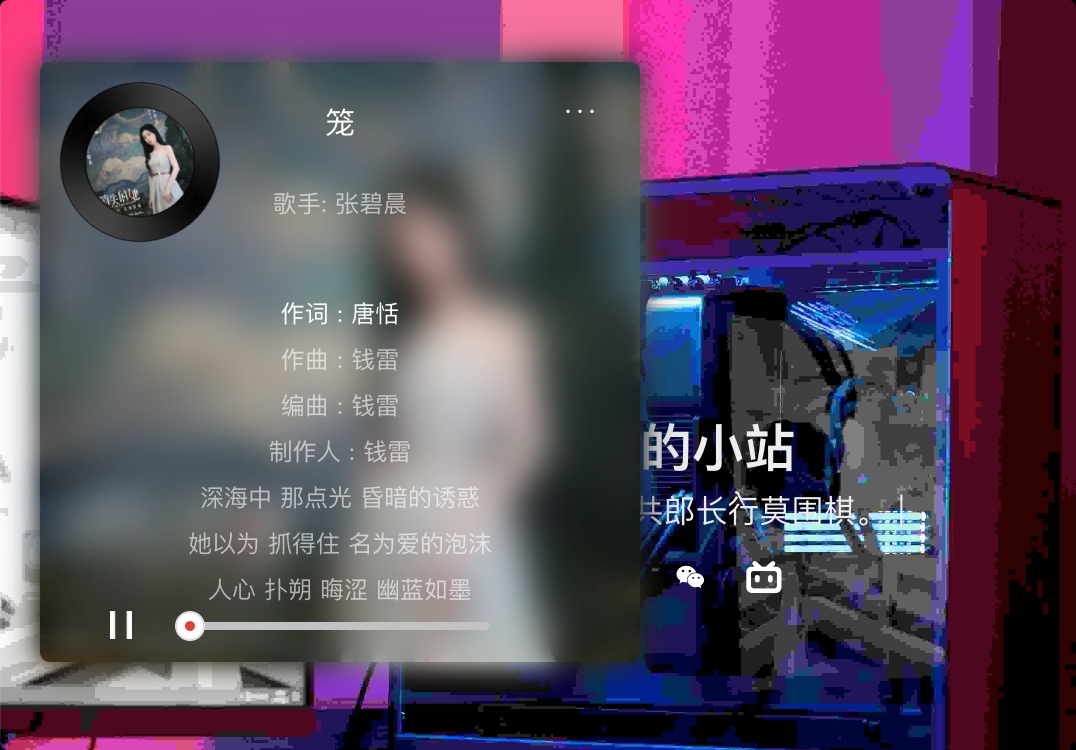
播放音乐
我们使多媒体音乐播放起来,在methods中加入Player函数,完整示例代码,css没变
player.vue
html
<template>
  <div>
    <!-- 播放盒子 -->
    <div class="zbox" :class="{ zbox_active: disActive }">
      <!--  首页的音乐封面   -->
      <div class="h_pan"
           :style="{ backgroundImage: 'url(' + pan + ')' }"
           :class="{ h_pan_active: disActive }"
           @click="DisActive">
        <img :src="musicImg" alt="" class="h_pan_c"/>
      </div>
      <!-- 音乐播放器  -->
      <div class="z_show_box"
           :style="{ backgroundImage: 'url(' + musicImg + ')' }"
           :class="{ z_show_box_active: disActive }"
           @dblclick="DisList">
        <!-- 第一层模糊背景 -->
        <div
            class="z_music_shlter_2"
            :style="{ backgroundImage: 'url(' + musicImg + ')' }"
            :class="{ z_shlter_active: disActive }"
        ></div>
        <!-- 第二层模糊背景 -->
        <div
            class="z_music_shlter"
            :style="{ backgroundImage: 'url(' + musicImg + ')' }"
            :class="{ z_shlter_active: disActive }"
        ></div>
        <!--        <div class="z_music_shlter_3"></div>-->
        <!--  音乐信息 -->
        <div class="z_music_dis">
          <!--  音乐列表菜单按钮  -->
          <div class="z_dis_list" @click="DisList">···</div>
          <!--  音乐标题  -->
          <p class="z_music_title">{{ musicTitle }}</p>
          <!--  音乐歌手名称  -->
          <p class="z_music_singer">歌手: {{ musicName }}</p>
          <!--  歌词显示区域  -->
          <ul class="z_music_words">
            <!-- 实际歌词列表 -->
            <div class="music_words_box" :style="{ top: wordsTop + 'px' }">
              <!-- 每行歌词 -->
              <li v-for="(item, index) in musicWords"
                  :key="index"
                  class="z_music_word"
                  :class="{ z_word_highlight: wordIndex == index }">
                {{ item }}
              </li>
            </div>
          </ul>
        </div>
        <!--  音乐播放控制 -->
        <div class="z_control_box">
          <!-- 播放按钮 -->
          <div class="z_control_button">
            <img :src="playIcon" alt="" class="z_control_icon"/>
          </div>
          <!-- 进度条 -->
          <div class="z_progress">
            <div class="z_progress_c" :style="{ width: currentProgress }">
              <div class="z_progress_circle">
                <div class="z_progress_circle_c"></div>
              </div>
            </div>
          </div>
        </div>
      </div>
      <video id="music" autoplay="autoplay" :src="musicUrl" name="media"></video>
    </div>
  </div>
</template>

<script>
import pan from "@/components/zw-player/img/pan.png";
import play from "@/components/zw-player/img/play.png";
import pause from "@/components/zw-player/img/pause.png";
import add from "@/components/zw-player/img/add.png";
import shlter from "@/components/zw-player/img/list_pan.png";
import listPlay from "@/components/zw-player/img/list_play_hover.png";
import state0 from "@/components/zw-player/img/state_0.png";
import state1 from "@/components/zw-player/img/state_1.png";
import talkicon1 from "@/components/zw-player/img/talkicon1.png";
import talkicon2 from "@/components/zw-player/img/talkicon2.png";
import $ from "jquery";

export default {
  name: "Player",

  data() {
    return {
      //歌词滚动
      o: 0,
      top: 0,
      //图片
      pan,
      play,
      pause,
      add,
      shlter,
      listPlay,
      state0,
      state1,
      talkicon1,
      talkicon2,
      playState: true, //播放状态,默认自动播放
      playIcon: pause, //暂停按钮
      musicUrl: "http://m701.music.126.net/20230709214232/bae3f525a80153f6194d12ef1e3f3103/jdymusic/obj/wo3DlMOGwrbDjj7DisKw/28895067044/34d3/e9e3/898d/9a21a1e4304951c6ab3ffdc34a4fc01e.mp3",
      musicImg: "https://p1.music.126.net/XsTsiy7w_IAtqLIc6kMRAg==/109951168690739808.jpg?param=300y300",
      musicWords: [],//歌词
      wordsTime: [], //歌词时间
      musicTitle: "笼",//歌名
      musicName: "张碧晨",//歌手
      disActive: false,//是否展示播放器
      listIsDis: false,//是否展示播放列表
      wordsTop: 0,//歌词位置,歌词滚动时,将某行歌词的top给其
      wordIndex: 0,//当前所在行歌词
      currentProgress: "0%",//当前播放进度(进度条宽度)
    }
  },
  created() {
    let str = "[00:00.00] 作词 : 唐恬\n[00:01.00] 作曲 : 钱雷\n[00:02.00] 编曲 : 钱雷\n[00:03.00] 制作人 : 钱雷\n[00:33.10]深海中 那点光 昏暗的诱惑\n[00:40.94]她以为 抓得住 名为爱的泡沫\n[00:48.71]人心 扑朔 晦涩 幽蓝如墨\n[00:56.52]怎么 猜透 看透 故事的结果\n[01:01.66]\n[01:20.06]为何绚烂 叫人扑空\n[01:24.04]为何爱我者予我牢笼\n[01:28.07]为何等待 都徒劳无功\n[01:31.95]为何囚人者也像困兽(为什么)\n[01:36.79]越珍贵 越浪费\n[01:40.77]致命的伤 诞生于亲密\n[01:45.03]越追问 越无解\n[01:48.85]哪有答案 不过是咒语\n[01:54.39]都在笼中\n[01:57.46]\n[02:11.93]出口就 在身后 只需要回头\n[02:20.03]为什么 人们却 亲手上一把锁\n[02:27.71]不甘 不得 不休 囚人自囚\n[02:35.56]为爱 为爱 为爱 都只是为我\n[02:40.98]\n[02:47.33]为何绚烂 叫人扑空\n[02:50.90]为何爱我者予我牢笼\n[02:54.91]为何等待 都徒劳无功\n[02:58.84]为何囚人者也像困兽(为什么)\n[03:03.96]越珍贵 越浪费\n[03:07.97]致命的伤 诞生于亲密\n[03:11.99]越追问 越无解\n[03:15.83]答案写在笼中 只为困住你\n[03:24.72]\n[03:35.02]为何拥抱 那么疼痛\n[03:38.82]为何爱我者把我葬送\n[03:42.94]为何港湾 会变作迷宫\n[03:46.83]为何镜中人失去面孔(为什么)\n[03:51.96]越珍贵 越浪费\n[03:55.79]致命的伤 诞生于亲密\n[03:59.83]越追问 越无解\n[04:03.81]哪有答案 不过是咒语\n[04:09.08]爱不爱我\n[04:23.30]谁邀你入笼\n[04:32.99]\n[04:33.44] 配唱编写 : 钱雷@勇士音乐\n[04:33.90] 吉他 : 高飞@勇士音乐\n[04:34.36] 吉他录音 : 付威@Legend(来真的•北京)Recording Studio\n[04:34.81] 贝斯 : 赵浩成\n[04:35.27] Bass录音室 : SEDAR Studio\n[04:35.73] 和音 : 王笑文(丸子)\n[04:36.18] 弦乐编写 : 胡静成\n[04:36.64] 弦乐 : 国际首席爱乐乐团\n[04:37.10] 弦乐录音 : 王小四@金田录音棚\n[04:37.56] 主唱录音师 : 倪涵文@Studio 21A\n[04:38.01] 主唱录音棚 : Studio 21A beijing\n[04:38.47] 主唱编辑 : 姚海毅@勇士音乐\n[04:38.93] 混音&母带 : 姚海毅@勇士音乐\n[04:39.38] 统筹执行:王山山@勇士音乐\n[04:39.84] 词曲版权管理方:索尼音乐版权代理(北京)有限公司\n[04:40.30] 音乐发行营销:奔跑怪物\n[04:40.75] 联合推广:天浩悦动推广组\n"
    let info = this.Cut(str);
    this.musicWords = info.wordArr;
    this.wordsTime = info.timeArr;
  },
  mounted() {
    this.Player();
  },
  methods: {
    /*是否展开播放页*/
    DisActive() {
      this.disActive = !this.disActive;
    },
    /*是否展示音乐列表页*/
    DisList() {
      this.listIsDis = !this.listIsDis;
    },
    //歌词截取函数
    Cut(str) {
      let timeArr = [];
      let wordArr = [];
      timeArr = str.split("[");
      timeArr.splice(0, 1);
      for (let i = 0; i < timeArr.length; i++) {
        let cut = timeArr[i].split("]");
        let time = cut[0].split(".")[0].split(":");
        timeArr[i] = Number.parseInt(time[0]) * 60 + Number.parseInt(time[1]);
        timeArr[i] = isNaN(timeArr[i]) ? 0 : timeArr[i]; //处理NaN
        wordArr[i] = this.Rtrim(this.Ltrim(cut[1]));
      }
      return {timeArr: timeArr, wordArr: wordArr};
    },
    Ltrim(s) {
      return s.replace(/(^\s*)/g, "");
    },
    Rtrim(s) {
      return s.replace(/(\s*$)/g, "");
    },
    //播放音乐
    Player() {
      let self = this;
      let player = $("#music")[0];
      let playerTimer = setInterval(timer, 1000);
      $(".z_control_icon").click();
      //定时器函数
      $("body").on("click", () => {
        player.play();
        $("body").unbind("click");
      });

      //歌词定时器,定时滚动
      function timer() {
        self.currentProgress = `${(player.currentTime / player.duration) *
        100}%`;
        //接着这里写歌词滚动
        if (player.currentTime >= self.wordsTime[self.o + 1]) {
          self.top += Number.parseInt(
              $(".z_music_word")
                  .eq(self.o)
                  .height() +
              Number.parseInt(
                  $(".z_music_word")
                      .eq(self.o)
                      .css("marginTop")
              )
          );
          if (self.top >= $(".z_music_words").height() / 2 - 11) {
            //开始滚动的高度
            self.wordsTop += -Number.parseInt(
                $(".z_music_word")
                    .eq(self.o)
                    .height() +
                Number.parseInt(
                    $(".z_music_word")
                        .eq(self.o)
                        .css("marginTop")
                )
            );
          }
          self.wordIndex = self.o + 1;
          self.o++;
        }
        if (player.currentTime >= player.duration) {
          //切歌
          if (self.musicList.length !== 1) {
            //只有一首歌  重复播放
            if (self.musicState === 0) {
              self.thisMusicIndex =
                  self.thisMusicIndex >= self.musicList.length - 1
                      ? 0
                      : self.thisMusicIndex + 1;
              self._getInfo();
            }
          }
          player.play();
          self.top = 0;
          self.o = 0;
          self.wordIndex = 0;
          self.wordsTop = 0;
          self.currentProgress = "0%";
        }
      }

      //进度条控制,给进度条绑定监听实践,使其有滑动效果
      $(".z_progress").on("mousedown", ev => {
        console.log("鼠标滑动");
        let e = ev || event;
        let pro =
            (e.clientX - $(".z_progress").offset().left) / $(".z_progress").width();
        clearInterval(playerTimer);
        this.currentProgress = `${pro * 100}%`;
        $(document).on("mousemove", ev => {
          let e = ev || event;
          pro =
              (e.clientX - $(".z_progress").offset().left) / $(".z_progress").width();
          this.currentProgress = `${pro * 100}%`;
        });
        $(document).on("mouseup", () => {
          player.currentTime = player.duration * pro;
          let c_arr = [...this.wordsTime];
          c_arr.push(player.currentTime);
          c_arr.sort((l, r) => {
            return l - r;
          });
          let now_o = c_arr.indexOf(player.currentTime) - 1;
          let diff_h = 0;
          if (this.o < now_o) {
            for (let i = this.o; i < now_o; i++) {
              diff_h += -Number.parseInt(
                  $(".z_music_word")
                      .eq(i)
                      .height() +
                  Number.parseInt(
                      $(".z_music_word")
                          .eq(i)
                          .css("marginTop")
                  )
              );
            }
          } else {
            for (let i = now_o; i < this.o; i++) {
              diff_h += Number.parseInt(
                  $(".z_music_word")
                      .eq(i)
                      .height() +
                  Number.parseInt(
                      $(".z_music_word")
                          .eq(i)
                          .css("marginTop")
                  )
              );
            }
          }
          this.wordsTop += diff_h;
          console.log(this.wordsTop, diff_h)
          self.wordIndex = this.o = now_o;
          clearInterval(playerTimer);
          playerTimer = setInterval(timer, 1000);
          this.playState = true;
          this.playIcon = this.pause;
          if (player.currentTime >= player.duration) {
            this.top = 0;
            this.o = 0;
            this.wordIndex = 0;
            this.wordsTop = 0;
            this.currentProgress = "0%";
          }
          player.play();
          $(document).unbind("mousemove");
          $(document).unbind("mouseup");
        });
      });
      //播放暂停按钮控制
      $(".z_control_icon").on("click", () => {
        if (this.playState) {
          player.pause();
          this.playState = false;
          this.playIcon = this.play;
          clearInterval(playerTimer);
        } else {
          player.play();
          this.playState = true;
          this.playIcon = this.pause;
          clearInterval(playerTimer);
          playerTimer = setInterval(timer, 1000);
        }
      });
    },
  }
}
</script>

<style scoped>
@import url("./player.css");
</style>页面效果,musicUrl从有时候访问不到,是因为时间戳校验不合法,重新去获取一条音乐链接即可
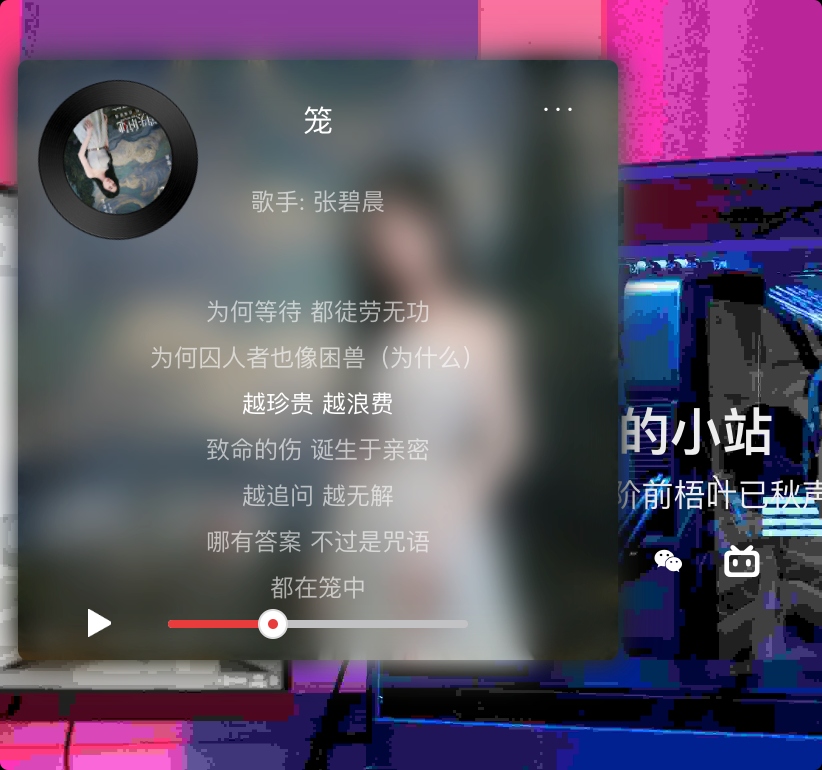
调用接口获取音乐信息
刚刚我们的音乐信息是写死的(ps:张碧晨这首歌这段时间挺火的),现在我们改为从接口获取音乐信息,我这边的话采用的是从热门歌曲获取第一首歌
修改js部分
js
import pan from "@/components/zw-player/img/pan.png";
import play from "@/components/zw-player/img/play.png";
import pause from "@/components/zw-player/img/pause.png";
import add from "@/components/zw-player/img/add.png";
import shlter from "@/components/zw-player/img/list_pan.png";
import listPlay from "@/components/zw-player/img/list_play_hover.png";
import state0 from "@/components/zw-player/img/state_0.png";
import state1 from "@/components/zw-player/img/state_1.png";
import talkicon1 from "@/components/zw-player/img/talkicon1.png";
import talkicon2 from "@/components/zw-player/img/talkicon2.png";
import $ from "jquery";
import {getHotMusic, getHotTalk, getMusicUrl, getWords} from "@/components/zw-player/api/music";

export default {
  name: "Player",

  data() {
    return {
      //歌词滚动
      o: 0,
      top: 0,
      //图片
      pan,
      play,
      pause,
      add,
      shlter,
      listPlay,
      state0,
      state1,
      talkicon1,
      talkicon2,
      playState: true, //播放状态,默认自动播放
      playIcon: pause, //暂停按钮
      // musicUrl: "http://m701.music.126.net/20230709214232/bae3f525a80153f6194d12ef1e3f3103/jdymusic/obj/wo3DlMOGwrbDjj7DisKw/28895067044/34d3/e9e3/898d/9a21a1e4304951c6ab3ffdc34a4fc01e.mp3",
      // musicImg: "https://p1.music.126.net/XsTsiy7w_IAtqLIc6kMRAg==/109951168690739808.jpg?param=300y300",
      musicUrl: "",
      musicImg: "",
      musicWords: [],//歌词
      wordsTime: [], //歌词时间
      musicTitle: "",//歌名
      musicName: "",//歌手
      disActive: false,//是否展示播放器
      listIsDis: false,//是否展示播放列表
      wordsTop: 0,//歌词位置,歌词滚动时,将某行歌词的top给其
      wordIndex: 0,//当前所在行歌词
      currentProgress: "0%",//当前播放进度(进度条宽度)
      //音乐列表类型
      musicTypeList: [
        {name: "热歌榜", id: 3778678},
        {name: "新歌榜", id: 3779629},
        {name: "飙升榜", id: 19723756},
        {name: "嘻哈榜", id: 991319590},
        {name: "本地歌曲", id: -1}
      ],
      thisMusicType: -1, //默认选择本地音乐
      musicAlertState: false,// 音乐提示状态,默认不显示
      musicAlertVal: "",// 音乐提示信息,默认空串
      musicList: [],//音乐列表
      thisMusicIndex: 1,//当前音乐下标
      thisListPage: 1, //当前音乐列表页码,默认第一页
      hotTalkList: [], //热评列表
    }
  },
  created() {
    // let str = "[00:00.00] 作词 : 唐恬\n[00:01.00] 作曲 : 钱雷\n[00:02.00] 编曲 : 钱雷\n[00:03.00] 制作人 : 钱雷\n[00:33.10]深海中 那点光 昏暗的诱惑\n[00:40.94]她以为 抓得住 名为爱的泡沫\n[00:48.71]人心 扑朔 晦涩 幽蓝如墨\n[00:56.52]怎么 猜透 看透 故事的结果\n[01:01.66]\n[01:20.06]为何绚烂 叫人扑空\n[01:24.04]为何爱我者予我牢笼\n[01:28.07]为何等待 都徒劳无功\n[01:31.95]为何囚人者也像困兽(为什么)\n[01:36.79]越珍贵 越浪费\n[01:40.77]致命的伤 诞生于亲密\n[01:45.03]越追问 越无解\n[01:48.85]哪有答案 不过是咒语\n[01:54.39]都在笼中\n[01:57.46]\n[02:11.93]出口就 在身后 只需要回头\n[02:20.03]为什么 人们却 亲手上一把锁\n[02:27.71]不甘 不得 不休 囚人自囚\n[02:35.56]为爱 为爱 为爱 都只是为我\n[02:40.98]\n[02:47.33]为何绚烂 叫人扑空\n[02:50.90]为何爱我者予我牢笼\n[02:54.91]为何等待 都徒劳无功\n[02:58.84]为何囚人者也像困兽(为什么)\n[03:03.96]越珍贵 越浪费\n[03:07.97]致命的伤 诞生于亲密\n[03:11.99]越追问 越无解\n[03:15.83]答案写在笼中 只为困住你\n[03:24.72]\n[03:35.02]为何拥抱 那么疼痛\n[03:38.82]为何爱我者把我葬送\n[03:42.94]为何港湾 会变作迷宫\n[03:46.83]为何镜中人失去面孔(为什么)\n[03:51.96]越珍贵 越浪费\n[03:55.79]致命的伤 诞生于亲密\n[03:59.83]越追问 越无解\n[04:03.81]哪有答案 不过是咒语\n[04:09.08]爱不爱我\n[04:23.30]谁邀你入笼\n[04:32.99]\n[04:33.44] 配唱编写 : 钱雷@勇士音乐\n[04:33.90] 吉他 : 高飞@勇士音乐\n[04:34.36] 吉他录音 : 付威@Legend(来真的•北京)Recording Studio\n[04:34.81] 贝斯 : 赵浩成\n[04:35.27] Bass录音室 : SEDAR Studio\n[04:35.73] 和音 : 王笑文(丸子)\n[04:36.18] 弦乐编写 : 胡静成\n[04:36.64] 弦乐 : 国际首席爱乐乐团\n[04:37.10] 弦乐录音 : 王小四@金田录音棚\n[04:37.56] 主唱录音师 : 倪涵文@Studio 21A\n[04:38.01] 主唱录音棚 : Studio 21A beijing\n[04:38.47] 主唱编辑 : 姚海毅@勇士音乐\n[04:38.93] 混音&母带 : 姚海毅@勇士音乐\n[04:39.38] 统筹执行:王山山@勇士音乐\n[04:39.84] 词曲版权管理方:索尼音乐版权代理(北京)有限公司\n[04:40.30] 音乐发行营销:奔跑怪物\n[04:40.75] 联合推广:天浩悦动推广组\n"
    // let info = this.Cut(str);
    // this.musicWords = info.wordArr;
    // this.wordsTime = info.timeArr;
    //默认获取热歌榜音乐
    this.getMusicListByType(3778678);
  },
  mounted() {
    setTimeout(() => {
      this.Player();
    }, 1000)
  },
  methods: {
    /*音乐播放器提示*/
    MusicAlert(val) {
      this.musicAlertState = true;
      this.musicAlertVal = val;
      clearTimeout(this.musicAlertTimer);
      this.musicAlertTimer = setTimeout(() => {
        this.musicAlertState = false;
        this.musicAlertVal = "";
      }, 2000);
    },
    /*获取音乐列表*/
    getMusicListByType(id) {
      if (this.thisMusicType !== id) {
        this.notPlay = [];
        //如果是本地音乐
        if (id === -1) {
          if (this.myMusicList.length !== 0) {
            this.musicList = this.myMusicList;
            this.thisMusicType = id;
            this.thisMusicIndex = 0;
            this.thisListPage = 1;
            this._getInfo();
            this.top = 0;
            this.o = 0;
            this.wordIndex = 0;
            this.wordsTop = 0;
            this.currentProgress = "0%";
            if (!this.playState) {
              $(".z_control_icon").click();
            }
          } else {
            //自定义库没有歌曲 提示需要搜索才可以添加
            this.MusicAlert("没有歌曲,需要自己添加");
          }
        } else {
          //根据id获取歌曲列表
          getHotMusic(id).then(res => {
            this.musicList = res.data.playlist.tracks.splice(0, 200);
            this.thisMusicType = id;
            this.thisMusicIndex = 0;
            this.thisListPage = 1;
            this.getMusicInfo();
            this.top = 0;
            this.o = 0;
            this.wordIndex = 0;
            this.wordsTop = 0;
            this.currentProgress = "0%";
            if (!this.playState) {
              $(".z_control_icon").click();
            }
          });
        }
      }
    },
    /*获取歌曲信息*/
    getMusicInfo() {
      getMusicUrl(this.musicList[this.thisMusicIndex].id).then(res => {
        //如果获取到的音乐数据为空
        if (res.data.data[0].url == null || res.data.data[0].url === "" || res.data.data[0].url === undefined) {
          if (this.notPlay.length !== this.musicList.length) {
            let nextIndex = this.thisMusicIndex + 1;
            if (this.notPlay.indexOf(this.thisMusicIndex) === -1) {
              this.notPlay.push(this.thisMusicIndex);
            }
            this.MusicAlert(`${this.musicList[this.thisMusicIndex].name}因为一些原因不能播放`);
            this.ListPlay(nextIndex); //寻找下一首歌  直到找到

            //提示这首歌不能放
          } else {
            //遍历完没有找到
            console.log("not");
            this.MusicAlert("此列表所有歌都不能播放");
          }
        } else {
          //获取音频链接
          this.musicUrl = res.data.data[0].url.replace("http://", "https://");
          //获取音乐封面
          this.musicImg = this.musicList[this.thisMusicIndex].al.picUrl.replace(
              "http://",
              "https://"
          ) + "?param=300y300";
          //获取音乐标题
          this.musicTitle = this.musicList[this.thisMusicIndex].name;
          //获取歌手名称
          let name_arr = [];
          this.musicList[this.thisMusicIndex].ar.forEach(i => {
            name_arr.push(i.name);
          });
          this.musicName = name_arr.join("/");
          //获取歌词
          getWords(this.musicList[this.thisMusicIndex].id).then(res => {
            if (!res.data.nolyric) {
              let info = this.Cut(res.data.lrc.lyric);
              this.musicWords = info.wordArr;
              this.wordsTime = info.timeArr;
            }
          });
          //获取热评,默认获取三条
          getHotTalk(this.musicList[this.thisMusicIndex].id).then(res => {
            let count = 0;
            this.hotTalkList = res.data.hotComments.splice(0, 3);
            this.hotTalkList.forEach(e => {
              count += e.content.length;
              e.user.avatarUrl = e.user.avatarUrl + "?param=50y50";
            });
            if (count >= 200) {
              this.hotTalkList = this.hotTalkList.slice(0, 2);
            }
          });
        }
      });
    },
    /*是否展开播放页*/
    DisActive() {
      this.disActive = !this.disActive;
    },
    /*是否展示音乐列表页*/
    DisList() {
      this.listIsDis = !this.listIsDis;
    },
    //歌词截取函数
    Cut(str) {
      let timeArr = [];
      let wordArr = [];
      timeArr = str.split("[");
      timeArr.splice(0, 1);
      for (let i = 0; i < timeArr.length; i++) {
        let cut = timeArr[i].split("]");
        let time = cut[0].split(".")[0].split(":");
        timeArr[i] = Number.parseInt(time[0]) * 60 + Number.parseInt(time[1]);
        timeArr[i] = isNaN(timeArr[i]) ? 0 : timeArr[i]; //处理NaN
        wordArr[i] = this.Rtrim(this.Ltrim(cut[1]));
      }
      return {timeArr: timeArr, wordArr: wordArr};
    },
    Ltrim(s) {
      return s.replace(/(^\s*)/g, "");
    },
    Rtrim(s) {
      return s.replace(/(\s*$)/g, "");
    },
    /*播放音乐*/
    Player() {
      let self = this;
      let player = $("#music")[0];
      let playerTimer = setInterval(timer, 1000);
      $(".z_control_icon").click();
      //定时器函数
      //页面的任何一处被点击,就开始播放音乐
      $("body").on("click", () => {
        player.play();
        $("body").unbind("click");
      });
      //歌词定时器,定时滚动
      function timer() {
        self.currentProgress = `${(player.currentTime / player.duration) *
        100}%`;
        //接着这里写歌词滚动
        if (player.currentTime >= self.wordsTime[self.o + 1]) {
          self.top += Number.parseInt(
              $(".z_music_word")
                  .eq(self.o)
                  .height() +
              Number.parseInt(
                  $(".z_music_word")
                      .eq(self.o)
                      .css("marginTop")
              )
          );
          if (self.top >= $(".z_music_words").height() / 2 - 11) {
            //开始滚动的高度
            self.wordsTop += -Number.parseInt(
                $(".z_music_word")
                    .eq(self.o)
                    .height() +
                Number.parseInt(
                    $(".z_music_word")
                        .eq(self.o)
                        .css("marginTop")
                )
            );
          }
          self.wordIndex = self.o + 1;
          self.o++;
        }
        if (player.currentTime >= player.duration) {
          //切歌
          if (self.musicList.length !== 1) {
            //只有一首歌  重复播放
            if (self.musicState === 0) {
              self.thisMusicIndex =
                  self.thisMusicIndex >= self.musicList.length - 1
                      ? 0
                      : self.thisMusicIndex + 1;
              self._getInfo();
            }
          }
          player.play();
          self.top = 0;
          self.o = 0;
          self.wordIndex = 0;
          self.wordsTop = 0;
          self.currentProgress = "0%";
        }
      }
      //进度条控制,给进度条绑定监听实践,使其有滑动效果
      $(".z_progress").on("mousedown", ev => {
        console.log("鼠标滑动");
        let e = ev || event;
        let pro =
            (e.clientX - $(".z_progress").offset().left) / $(".z_progress").width();
        clearInterval(playerTimer);
        this.currentProgress = `${pro * 100}%`;
        $(document).on("mousemove", ev => {
          let e = ev || event;
          pro =
              (e.clientX - $(".z_progress").offset().left) / $(".z_progress").width();
          this.currentProgress = `${pro * 100}%`;
        });
        $(document).on("mouseup", () => {
          player.currentTime = player.duration * pro;
          let c_arr = [...this.wordsTime];
          c_arr.push(player.currentTime);
          c_arr.sort((l, r) => {
            return l - r;
          });
          let now_o = c_arr.indexOf(player.currentTime) - 1;
          let diff_h = 0;
          if (this.o < now_o) {
            for (let i = this.o; i < now_o; i++) {
              diff_h += -Number.parseInt(
                  $(".z_music_word")
                      .eq(i)
                      .height() +
                  Number.parseInt(
                      $(".z_music_word")
                          .eq(i)
                          .css("marginTop")
                  )
              );
            }
          } else {
            for (let i = now_o; i < this.o; i++) {
              diff_h += Number.parseInt(
                  $(".z_music_word")
                      .eq(i)
                      .height() +
                  Number.parseInt(
                      $(".z_music_word")
                          .eq(i)
                          .css("marginTop")
                  )
              );
            }
          }
          this.wordsTop += diff_h;
          console.log(this.wordsTop, diff_h)
          self.wordIndex = this.o = now_o;
          clearInterval(playerTimer);
          playerTimer = setInterval(timer, 1000);
          this.playState = true;
          this.playIcon = this.pause;
          if (player.currentTime >= player.duration) {
            this.top = 0;
            this.o = 0;
            this.wordIndex = 0;
            this.wordsTop = 0;
            this.currentProgress = "0%";
          }
          player.play();
          $(document).unbind("mousemove");
          $(document).unbind("mouseup");
        });
      });
      //播放暂停按钮控制
      $(".z_control_icon").on("click", () => {
        if (this.playState) {
          player.pause();
          this.playState = false;
          this.playIcon = this.play;
          clearInterval(playerTimer);
        } else {
          player.play();
          this.playState = true;
          this.playIcon = this.pause;
          clearInterval(playerTimer);
          playerTimer = setInterval(timer, 1000);
        }
      });
    },
  }
}播放列表页面
效果图
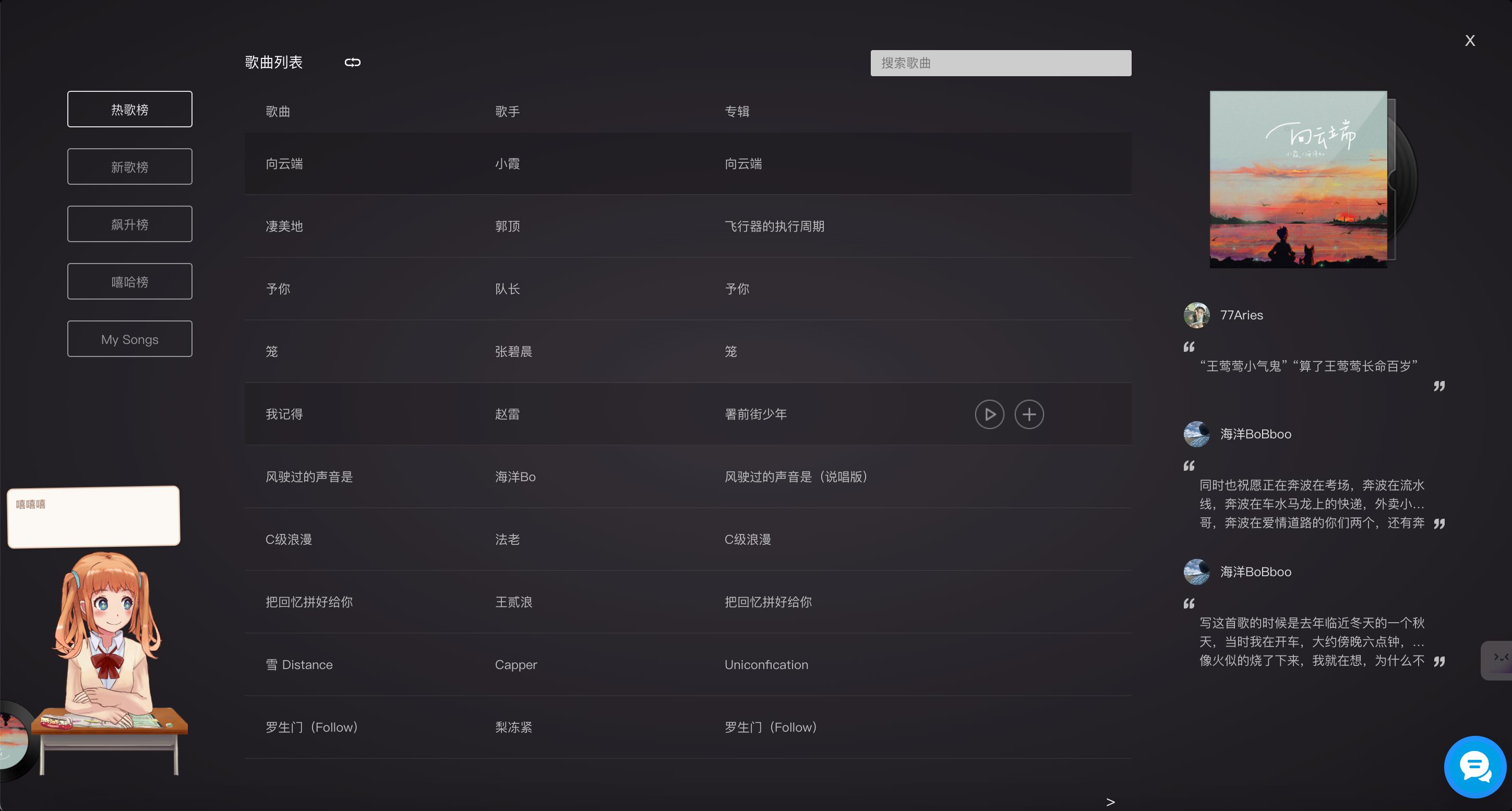
详细代码
player.vue
html
<template>
<div>
<!-- 播放列表 -->
<transition name="z_dis_list">
<div class="z_music_list_box" v-if="listIsDis">
<!-- 错误提示 -->
<transition name="z_music_alert">
<span class="z_music_alert" v-if="musicAlertState">{{ musicAlertVal }}</span>
</transition>
<!-- 列表关闭按钮 -->
<div class="z_music_list_close" @click="DisList">x</div>
<!-- 音乐列表 -->
<div class="z_music_list">
<!-- 音乐列表左部分 -->
<div class="z_list_l">
<!-- 音乐列表类型 -->
<ul class="z_music_type">
<li v-for="(item, index) in musicTypeList" :key="index"
@click="getMusicListByType(item.id)" :class="{ z_music_type_active: item.id === thisMusicType }">
{{ item.name }}
</li>
</ul>
<!-- 音乐列表头部 -->
<div class="z_music_list_head">
<span style="font-size: 14px;">歌曲列表</span>
<img :src="musicStateButton" alt=""
class="z_music_state"
@click="MusicStateChange"/>
<!-- 音乐搜索区域 -->
<div class="z_music_search_box">
<!-- 音乐搜索输入框 -->
<input type="text" class="z_music_search" v-model="musicSearchVal" placeholder="搜索歌曲"/>
<!-- 音乐搜索动画,展示搜索关键字相关歌曲 -->
<transition name="z_music_search">
<!-- 关键字相关音乐名称列表 -->
<ul class="z_search_list" v-if="musicSearchVal !== ''">
<li v-for="(item, index) in musicSearchList"
:key="index"
@click="ListAdd(item)">
<!-- 歌名 -->
<span class="z_music_search_name">{{ item.name }}</span>
<!-- 歌手名称 -->
<span class="z_music_search_singer">{{ item.artists[0].name }}</span>
</li>
</ul>
</transition>
</div>
</div>
<!-- 音乐列表 -->
<div class="music_ul_title">
<span>歌曲</span><span>歌手</span><span>专辑</span>
</div>
<ul class="z_music_search_list">
<li v-for="(item, index) in thisMusicList"
:key="index"
@mouseover="ButtonActive(index)"
@dblclick="ListPlay((thisListPage - 1) * 10 + index)">
<div class="z_this_music_shlter" v-if="(thisListPage - 1) * 10 + index === thisMusicIndex"></div>
<!-- 歌名 -->
<span>{{ item.name }}</span>
<!-- 歌手名称 -->
<span>{{ item.ar[0].name }}</span>
<!-- 专辑名称 -->
<span>{{ item.al.name }}</span>
<!-- 列表中每行按钮,触摸时触发显示 -->
<transition name="z_music_search_list">
<div class="z_music_button" v-if="listButtonActiveIndex === index">
<div class="z_list_play" title="播放这首歌"
:style="{ backgroundImage: 'url(' + listPlay + ')' }"
@click="ListPlay((thisListPage - 1) * 10 + index)">
</div>
<div class="z_list_play" title="添加到《本地歌曲》" :style="{ backgroundImage: 'url(' + add + ')' }"
@click="ListAdd(item)" v-if="thisMusicType !== -1">
</div>
</div>
</transition>
</li>
</ul>
<!-- 列表分页 -->
<div class="z_music_list_page">
<!-- 上一页 -->
<div class="z_page_last" v-if="thisListPage !== 1" @click="ListChange(true)">
上一页
</div>
<!-- 下一页 -->
<div class="z_page_next" v-if="thisListPage !== Math.ceil(musicList.length / 10)"
@click="ListChange(false)">
下一页
</div>
</div>
</div>
<div class="z_list_r">
<!-- 当前音乐封面 -->
<img class="z_music_list_bg" :src="musicImg"/>
<!-- 音乐封面图片框 -->
<div class="z_music_list_shlter" :style="{ backgroundImage: 'url(' + shlter + ')' }"></div>
<!-- 音乐评论列表页 -->
<ul class="z_music_talk_list">
<li v-for="(item, index) in hotTalkList" :key="index">
<div class="z_talk_head">
<!-- 评论头像 -->
<img :src="item.user.avatarUrl" alt="" class="z_talk_head_img"/>
<!-- 评论昵称 -->
<span class="z_talk_head_name">{{ item.user.nickname }}</span>
</div>
<!-- 评论内容 -->
<p class="z_talk_content">
<!-- 双引号左 -->
<img class="z_talk_icon_l" :src="talkicon1"/>
{{ item.content }}
<!-- 双引号右 -->
<img class="z_talk_icon_r" :src="talkicon2"/>
</p>
</li>
</ul>
</div>
</div>
</div>
</transition>
<!-- 播放盒子 -->
<div class="zbox" :class="{ zbox_active: disActive }">
<!-- 首页的音乐封面 -->
<div class="h_pan"
:style="{ backgroundImage: 'url(' + pan + ')' }"
:class="{ h_pan_active: disActive }"
@click="DisActive">
<img :src="musicImg" alt="" class="h_pan_c"/>
</div>
<!-- 音乐播放器 -->
<div class="z_show_box"
:style="{ backgroundImage: 'url(' + musicImg + ')' }"
:class="{ z_show_box_active: disActive }"
@dblclick="DisList">
<!-- 第一层模糊背景 -->
<div
class="z_music_shlter_2"
:style="{ backgroundImage: 'url(' + musicImg + ')' }"
:class="{ z_shlter_active: disActive }"
></div>
<!-- 第二层模糊背景 -->
<div
class="z_music_shlter"
:style="{ backgroundImage: 'url(' + musicImg + ')' }"
:class="{ z_shlter_active: disActive }"
></div>
<div class="z_music_shlter_3"></div>
<!-- 音乐信息 -->
<div class="z_music_dis">
<!-- 音乐列表菜单按钮 -->
<div class="z_dis_list" @click="DisList">···</div>
<!-- 音乐标题 -->
<p class="z_music_title">{{ musicTitle }}</p>
<!-- 音乐歌手名称 -->
<p class="z_music_singer">歌手: {{ musicName }}</p>
<!-- 歌词显示区域 -->
<ul class="z_music_words">
<!-- 实际歌词列表 -->
<div class="music_words_box" :style="{ top: wordsTop + 'px' }">
<!-- 每行歌词 -->
<li v-for="(item, index) in musicWords"
:key="index"
class="z_music_word"
:class="{ z_word_highlight: wordIndex == index }">
{{ item }}
</li>
</div>
</ul>
</div>
<!-- 音乐播放控制 -->
<div class="z_control_box">
<!-- 播放按钮 -->
<div class="z_control_button">
<img :src="playIcon" alt="" class="z_control_icon"/>
</div>
<!-- 进度条 -->
<div class="z_progress">
<div class="z_progress_c" :style="{ width: currentProgress }">
<div class="z_progress_circle">
<div class="z_progress_circle_c"></div>
</div>
</div>
</div>
</div>
</div>
<video id="music" autoplay="autoplay" :src="musicUrl" name="media"></video>
</div>
</div>
</template>
<script>
import pan from "@/components/zw-player/img/pan.png";
import play from "@/components/zw-player/img/play.png";
import pause from "@/components/zw-player/img/pause.png";
import add from "@/components/zw-player/img/add.png";
import shlter from "@/components/zw-player/img/list_pan.png";
import listPlay from "@/components/zw-player/img/list_play_hover.png";
import state0 from "@/components/zw-player/img/state_0.png";
import state1 from "@/components/zw-player/img/state_1.png";
import talkicon1 from "@/components/zw-player/img/talkicon1.png";
import talkicon2 from "@/components/zw-player/img/talkicon2.png";
import $ from "jquery";
import {
getHotMusic,
getHotTalk,
getMusicInfo,
getMusicUrl,
getSearchSuggest,
getWords
} from "@/components/zw-player/api/music";
export default {
name: "Player",
data() {
return {
//歌词滚动
o: 0,
top: 0,
//图片
pan,
play,
pause,
add,
shlter,
listPlay,
state0,
state1,
talkicon1,
talkicon2,
playState: true, //播放状态,默认自动播放
playIcon: pause, //暂停按钮
// musicUrl: "http://m701.music.126.net/20230709214232/bae3f525a80153f6194d12ef1e3f3103/jdymusic/obj/wo3DlMOGwrbDjj7DisKw/28895067044/34d3/e9e3/898d/9a21a1e4304951c6ab3ffdc34a4fc01e.mp3",
// musicImg: "https://p1.music.126.net/XsTsiy7w_IAtqLIc6kMRAg==/109951168690739808.jpg?param=300y300",
musicUrl: "",
musicImg: "",
musicWords: [],//歌词
wordsTime: [], //歌词时间
musicTitle: "",//歌名
musicName: "",//歌手
disActive: false,//是否展示播放器
listIsDis: false,//是否展示播放列表
wordsTop: 0,//歌词位置,歌词滚动时,将某行歌词的top给其
wordIndex: 0,//当前所在行歌词
currentProgress: "0%",//当前播放进度(进度条宽度)
//音乐列表类型
musicTypeList: [
{name: "热歌榜", id: 3778678},
{name: "新歌榜", id: 3779629},
{name: "飙升榜", id: 19723756},
// {name: "嘻哈榜", id: 991319590},
{name: "本地歌曲", id: -1}
],
thisMusicType: -1, //默认选择本地音乐
musicAlertState: false,// 音乐提示状态,默认不显示
musicAlertVal: "",// 音乐提示信息,默认空串
musicAlertTimer: "",//音乐提示时间
musicList: [],//音乐列表
notPlay:[],//不能播放的音乐列表
thisMusicIndex: 1,//当前音乐下标
thisListPage: 1, //当前音乐列表页码,默认第一页
hotTalkList: [], //热评列表
musicState: 0,//播放器状态
musicStateButton: state1, //音乐播放器状态按钮
musicSearchVal: '',//音乐搜索关键字
musicSearchList: [],//音乐搜索列表
listButtonActiveIndex: -1,
myMusicList: [],//本地歌曲列表
}
},
created() {
// let str = "[00:00.00] 作词 : 唐恬\n[00:01.00] 作曲 : 钱雷\n[00:02.00] 编曲 : 钱雷\n[00:03.00] 制作人 : 钱雷\n[00:33.10]深海中 那点光 昏暗的诱惑\n[00:40.94]她以为 抓得住 名为爱的泡沫\n[00:48.71]人心 扑朔 晦涩 幽蓝如墨\n[00:56.52]怎么 猜透 看透 故事的结果\n[01:01.66]\n[01:20.06]为何绚烂 叫人扑空\n[01:24.04]为何爱我者予我牢笼\n[01:28.07]为何等待 都徒劳无功\n[01:31.95]为何囚人者也像困兽(为什么)\n[01:36.79]越珍贵 越浪费\n[01:40.77]致命的伤 诞生于亲密\n[01:45.03]越追问 越无解\n[01:48.85]哪有答案 不过是咒语\n[01:54.39]都在笼中\n[01:57.46]\n[02:11.93]出口就 在身后 只需要回头\n[02:20.03]为什么 人们却 亲手上一把锁\n[02:27.71]不甘 不得 不休 囚人自囚\n[02:35.56]为爱 为爱 为爱 都只是为我\n[02:40.98]\n[02:47.33]为何绚烂 叫人扑空\n[02:50.90]为何爱我者予我牢笼\n[02:54.91]为何等待 都徒劳无功\n[02:58.84]为何囚人者也像困兽(为什么)\n[03:03.96]越珍贵 越浪费\n[03:07.97]致命的伤 诞生于亲密\n[03:11.99]越追问 越无解\n[03:15.83]答案写在笼中 只为困住你\n[03:24.72]\n[03:35.02]为何拥抱 那么疼痛\n[03:38.82]为何爱我者把我葬送\n[03:42.94]为何港湾 会变作迷宫\n[03:46.83]为何镜中人失去面孔(为什么)\n[03:51.96]越珍贵 越浪费\n[03:55.79]致命的伤 诞生于亲密\n[03:59.83]越追问 越无解\n[04:03.81]哪有答案 不过是咒语\n[04:09.08]爱不爱我\n[04:23.30]谁邀你入笼\n[04:32.99]\n[04:33.44] 配唱编写 : 钱雷@勇士音乐\n[04:33.90] 吉他 : 高飞@勇士音乐\n[04:34.36] 吉他录音 : 付威@Legend(来真的•北京)Recording Studio\n[04:34.81] 贝斯 : 赵浩成\n[04:35.27] Bass录音室 : SEDAR Studio\n[04:35.73] 和音 : 王笑文(丸子)\n[04:36.18] 弦乐编写 : 胡静成\n[04:36.64] 弦乐 : 国际首席爱乐乐团\n[04:37.10] 弦乐录音 : 王小四@金田录音棚\n[04:37.56] 主唱录音师 : 倪涵文@Studio 21A\n[04:38.01] 主唱录音棚 : Studio 21A beijing\n[04:38.47] 主唱编辑 : 姚海毅@勇士音乐\n[04:38.93] 混音&母带 : 姚海毅@勇士音乐\n[04:39.38] 统筹执行:王山山@勇士音乐\n[04:39.84] 词曲版权管理方:索尼音乐版权代理(北京)有限公司\n[04:40.30] 音乐发行营销:奔跑怪物\n[04:40.75] 联合推广:天浩悦动推广组\n"
// let info = this.Cut(str);
// this.musicWords = info.wordArr;
// this.wordsTime = info.timeArr;
//默认获取热歌榜音乐
this.getMusicListByType(3778678);
},
mounted() {
setTimeout(() => {
this.Player();
}, 1000)
},
computed: {
//将音乐列表做分页
thisMusicList() {
return [...this.musicList].splice((this.thisListPage - 1) * 10, 10); //分页
}
},
watch: {
//监听搜索关键字
musicSearchVal() {
if (this.musicSearchVal === "") {
this.musicSearchList = [];
} else {
getSearchSuggest(this.musicSearchVal).then(res => {
if (res.data.result.songs === undefined) {
this.musicSearchList = [];
} else {
this.musicSearchList = res.data.result.songs;
}
});
}
}
},
methods: {
/*修改列表页码*/
ListChange(isLast) {
if (isLast) {
this.thisListPage--;
} else {
this.thisListPage++;
}
},
/*列表页播放*/
ListPlay(id) {
if (this.thisMusicIndex !== id) {
this.thisMusicIndex = id > this.musicList.length - 1 ? 0 : id;
this.getMusicInfo();
this.top = 0;
this.o = 0;
this.wordIndex = 0;
this.wordsTop = 0;
this.currentProgress = "0%";
if (!this.playState) {
$(".z_control_icon").click();
}
}
},
/*添加音乐*/
ListAdd(obj) {
console.log(obj)
getMusicInfo(obj.id).then(res => {
this.musicSearchVal = "";
if (this.myMusicList != null && this.myMusicList.length === 0) {
this.myMusicList = [res.data.songs[0]];
this.getMusicListByType(-1);
//第一次搜索直接播放
} else {
this.myMusicList.push(res.data.songs[0]);
//提示已经添加进去
}
this.MusicAlert("添加成功");
});
},
/*按钮选择的歌曲列表类型*/
ButtonActive(id) {
this.listButtonActiveIndex = id;
},
/*当前音乐播放状态 单曲循环,列表循环*/
MusicStateChange() {
if (this.musicState === 0) {
this.musicState = 1;
this.musicStateButton = this.state0;
this.MusicAlert("已切换为单曲循环模式");
} else {
this.musicState = 0;
this.musicStateButton = this.state1;
this.MusicAlert("已切换为列表循环模式");
}
},
/*音乐播放器提示*/
MusicAlert(val) {
this.musicAlertState = true;
this.musicAlertVal = val;
clearTimeout(this.musicAlertTimer);
this.musicAlertTimer = setTimeout(() => {
this.musicAlertState = false;
this.musicAlertVal = "";
}, 2000);
},
/*获取音乐列表*/
getMusicListByType(id) {
if (this.thisMusicType !== id) {
this.notPlay = [];
//如果是本地音乐
if (id === -1) {
if (this.myMusicList != null && this.myMusicList.length !== 0) {
this.musicList = this.myMusicList;
this.thisMusicType = id;
this.thisMusicIndex = 0;
this.thisListPage = 1;
this.getMusicInfo();
this.top = 0;
this.o = 0;
this.wordIndex = 0;
this.wordsTop = 0;
this.currentProgress = "0%";
if (!this.playState) {
$(".z_control_icon").click();
}
} else {
//自定义库没有歌曲 提示需要搜索才可以添加
this.MusicAlert("没有歌曲,需要自己添加");
}
} else {
//根据id获取歌曲列表
getHotMusic(id).then(res => {
this.musicList = res.data.playlist.tracks.splice(0, 200);
this.thisMusicType = id;
this.thisMusicIndex = 0;
this.thisListPage = 1;
this.getMusicInfo();
this.top = 0;
this.o = 0;
this.wordIndex = 0;
this.wordsTop = 0;
this.currentProgress = "0%";
if (!this.playState) {
$(".z_control_icon").click();
}
});
}
}
},
/*获取歌曲信息*/
getMusicInfo() {
getMusicUrl(this.musicList[this.thisMusicIndex].id).then(res => {
//如果获取到的音乐数据为空
if (res.data.data[0].url == null || res.data.data[0].url === "" || res.data.data[0].url === undefined) {
if (this.notPlay.length !== this.musicList.length) {
let nextIndex = this.thisMusicIndex + 1;
if (this.notPlay.indexOf(this.thisMusicIndex) === -1) {
this.notPlay.push(this.thisMusicIndex);
}
this.MusicAlert(`${this.musicList[this.thisMusicIndex].name}因为一些原因不能播放`);
this.ListPlay(nextIndex); //寻找下一首歌 直到找到
//提示这首歌不能放
} else {
//遍历完没有找到
console.log("not");
this.MusicAlert("此列表所有歌都不能播放");
}
} else {
//获取音频链接
this.musicUrl = res.data.data[0].url.replace("http://", "https://");
//获取音乐封面
this.musicImg = this.musicList[this.thisMusicIndex].al.picUrl.replace(
"http://",
"https://"
) + "?param=300y300";
//获取音乐标题
this.musicTitle = this.musicList[this.thisMusicIndex].name;
//获取歌手名称
let name_arr = [];
this.musicList[this.thisMusicIndex].ar.forEach(i => {
name_arr.push(i.name);
});
this.musicName = name_arr.join("/");
//获取歌词
getWords(this.musicList[this.thisMusicIndex].id).then(res => {
if (!res.data.nolyric) {
let info = this.Cut(res.data.lrc.lyric);
this.musicWords = info.wordArr;
this.wordsTime = info.timeArr;
}
});
//获取热评,默认获取三条
getHotTalk(this.musicList[this.thisMusicIndex].id).then(res => {
let count = 0;
this.hotTalkList = res.data.hotComments.splice(0, 3);
this.hotTalkList.forEach(e => {
count += e.content.length;
e.user.avatarUrl = e.user.avatarUrl + "?param=50y50";
});
if (count >= 200) {
this.hotTalkList = this.hotTalkList.slice(0, 2);
}
});
}
});
},
/*是否展开播放页*/
DisActive() {
this.disActive = !this.disActive;
},
/*是否展示音乐列表页*/
DisList() {
this.listIsDis = !this.listIsDis;
},
//歌词截取函数
Cut(str) {
let timeArr = [];
let wordArr = [];
timeArr = str.split("[");
timeArr.splice(0, 1);
for (let i = 0; i < timeArr.length; i++) {
let cut = timeArr[i].split("]");
let time = cut[0].split(".")[0].split(":");
timeArr[i] = Number.parseInt(time[0]) * 60 + Number.parseInt(time[1]);
timeArr[i] = isNaN(timeArr[i]) ? 0 : timeArr[i]; //处理NaN
wordArr[i] = this.Rtrim(this.Ltrim(cut[1]));
}
return {timeArr: timeArr, wordArr: wordArr};
},
Ltrim(s) {
return s.replace(/(^\s*)/g, "");
},
Rtrim(s) {
return s.replace(/(\s*$)/g, "");
},
/*播放音乐*/
Player() {
let self = this;
let player = $("#music")[0];
let playerTimer = setInterval(timer, 1000);
$(".z_control_icon").click();
//定时器函数
//页面的任何一处被点击,就开始播放音乐
$("body").on("click", () => {
player.play();
$("body").unbind("click");
});
//歌词定时器,定时滚动
function timer() {
self.currentProgress = `${(player.currentTime / player.duration) *
100}%`;
//接着这里写歌词滚动
if (player.currentTime >= self.wordsTime[self.o + 1]) {
self.top += Number.parseInt(
$(".z_music_word")
.eq(self.o)
.height() +
Number.parseInt(
$(".z_music_word")
.eq(self.o)
.css("marginTop")
)
);
if (self.top >= $(".z_music_words").height() / 2 - 11) {
//开始滚动的高度
self.wordsTop += -Number.parseInt(
$(".z_music_word")
.eq(self.o)
.height() +
Number.parseInt(
$(".z_music_word")
.eq(self.o)
.css("marginTop")
)
);
}
self.wordIndex = self.o + 1;
self.o++;
}
if (player.currentTime >= player.duration) {
//切歌
if (self.musicList.length !== 1) {
//只有一首歌 重复播放
if (self.musicState === 0) {
self.thisMusicIndex =
self.thisMusicIndex >= self.musicList.length - 1
? 0
: self.thisMusicIndex + 1;
self._getInfo();
}
}
player.play();
self.top = 0;
self.o = 0;
self.wordIndex = 0;
self.wordsTop = 0;
self.currentProgress = "0%";
}
}
//进度条控制,给进度条绑定监听实践,使其有滑动效果
$(".z_progress").on("mousedown", ev => {
console.log("鼠标滑动");
let e = ev || event;
let pro =
(e.clientX - $(".z_progress").offset().left) / $(".z_progress").width();
clearInterval(playerTimer);
this.currentProgress = `${pro * 100}%`;
$(document).on("mousemove", ev => {
let e = ev || event;
pro =
(e.clientX - $(".z_progress").offset().left) / $(".z_progress").width();
this.currentProgress = `${pro * 100}%`;
});
$(document).on("mouseup", () => {
player.currentTime = player.duration * pro;
let c_arr = [...this.wordsTime];
c_arr.push(player.currentTime);
c_arr.sort((l, r) => {
return l - r;
});
let now_o = c_arr.indexOf(player.currentTime) - 1;
let diff_h = 0;
if (this.o < now_o) {
for (let i = this.o; i < now_o; i++) {
diff_h += -Number.parseInt(
$(".z_music_word")
.eq(i)
.height() +
Number.parseInt(
$(".z_music_word")
.eq(i)
.css("marginTop")
)
);
}
} else {
for (let i = now_o; i < this.o; i++) {
diff_h += Number.parseInt(
$(".z_music_word")
.eq(i)
.height() +
Number.parseInt(
$(".z_music_word")
.eq(i)
.css("marginTop")
)
);
}
}
this.wordsTop += diff_h;
console.log(this.wordsTop, diff_h)
self.wordIndex = this.o = now_o;
clearInterval(playerTimer);
playerTimer = setInterval(timer, 1000);
this.playState = true;
this.playIcon = this.pause;
if (player.currentTime >= player.duration) {
this.top = 0;
this.o = 0;
this.wordIndex = 0;
this.wordsTop = 0;
this.currentProgress = "0%";
}
player.play();
$(document).unbind("mousemove");
$(document).unbind("mouseup");
});
});
//播放暂停按钮控制
$(".z_control_icon").on("click", () => {
if (this.playState) {
player.pause();
this.playState = false;
this.playIcon = this.play;
clearInterval(playerTimer);
} else {
player.play();
this.playState = true;
this.playIcon = this.pause;
clearInterval(playerTimer);
playerTimer = setInterval(timer, 1000);
}
});
},
}
}
</script>
<style scoped>
@import url("./player.css");
</style>player.css
css
* {
    padding: 0;
    margin: 0;
    text-decoration: none;
    font-family: Consolas, '微软雅黑';
    box-sizing: border-box;
}

#music {
    width: 0;
    height: 0;
}

/*音乐盒子*/
.zbox {
    width: 100px;
    height: 100px;
    border-radius: 5px;
    position: fixed;
    z-index: 500;
    left: -40px;
    bottom: 10px;
    transition: all .5s;
}

/*播放盒子被点击时展开*/
.zbox_active {
    width: 300px;
    height: 300px;
    left: 20px;
    bottom: 320px;
}

/*播放盒子隐藏时被触摸的过渡动画*/
.zbox:hover:not(.zbox_active) {
    /*横向平移*/
    transform: translate(45px, 0);
}

/*音乐封面*/
.h_pan {
    width: 100px;
    height: 100px;
    background-size: 100% 100%;
    position: absolute;
    left: 10px;
    top: 10px;
    padding: 16px;
    /*顺时针旋转*/
    animation: h_pan 10s linear infinite;
    z-index: 103;
    transition: all .5s;
    cursor: pointer;
    border-radius: 100%;
}

/*旋转动画*/
@keyframes h_pan {
    0% {
        transform: rotate(0deg);
    }
    100% {
        transform: rotate(360deg);
    }
}

/*音乐封面被触摸时增加阴影*/
.h_pan:hover {
    box-shadow: 0px 0px 10px rgb(100, 100, 100);
    opacity: 1;
}

/*音乐封面图片大小*/
.h_pan_c {
    width: 100%;
    height: 100%;
    border-radius: 100%;
}

/*默认音乐播放页*/
.z_show_box {
    width: 100%;
    height: 100%;
    overflow: hidden;
    background-size: 100% 100%;
    border-radius: 5px;
    transition: all .5s;
    opacity: 0;
}

/*音乐封面被点击时,展开播放器页*/
.z_show_box_active {
    width: 100%;
    height: 100%;
    background-size: 100% 100%;
    border-radius: 5px;
    overflow: unset;
    /* older safari/Chrome browsers */
    -webkit-opacity: 1;
    /* Netscape and Older than Firefox 0.9 */
    -moz-opacity: 1;
    /* Safari 1.x (pre WebKit!) 老式khtml内核的Safari浏览器*/
    -khtml-opacity: 1;
    /* IE9 + etc...modern browsers */
    opacity: 1;
    /* IE 4-9 */
    filter: alpha(opacity=100);
    /*This works in IE 8 & 9 too*/
    -ms-filter: "progid:DXImageTransform.Microsoft.Alpha(Opacity=100)";
    /*IE4-IE9*/
    filter: progid:DXImageTransform.Microsoft.Alpha(Opacity=100);
}

/*音乐播放器背景高斯模糊*/
.z_music_shlter {
    width: 100%;
    height: 100%;
    position: absolute;
    filter: blur(10px);
    background-size: 100% 100%;
    transition: all .5s;
    z-index: 99;
    opacity: 0;
}

.z_music_shlter_2 {
    width: 100%;
    height: 100%;
    position: absolute;
    filter: blur(5px);
    background-size: 100% 100%;
    transition: all .5s;
    opacity: 0;
}

.z_music_shlter_3 {
    width: 100%;
    height: 100%;
    position: absolute;
    background-color: rgba(0, 0, 0, 0.1);
    transition: all .5s;
    border-radius: 5px;
    filter: blur(2px);
    opacity: 0;
}

/*音乐封面被点击时*/
.z_shlter_active {
    opacity: 1;
    z-index: unset;
}

/*音乐信息*/
.z_music_dis {
    width: 100%;
    height: 240px;
    position: relative;
}

/*音乐列表菜单按钮*/
.z_dis_list {
    position: absolute;
    right: 10px;
    top: 10px;
    width: 40px;
    height: 30px;
    line-height: 30px;
    text-align: center;
    cursor: pointer;
    font-size: 12px;
    color: white;
}

/*音乐标题*/
.z_music_title {
    width: 100%;
    height: 40px;
    text-align: center;
    color: white;
    line-height: 60px;
    font-size: 15px;
}

/*歌手*/
.z_music_singer {
    width: 100%;
    height: 40px;
    text-align: center;
    color: rgba(255, 255, 255, 0.6);
    line-height: 30px;
    font-size: 12px;
}

/*歌词所在区域*/
.music_words_box {
    width: 100%;
    height: auto;
    position: absolute;
    top: 0px;
    transition: all .5s;
}

/*歌词列表*/
.z_music_words {
    width: 240px;
    height: 160px;
    margin: auto;
    color: rgba(255, 255, 255, 0.6);
    text-align: center;
    overflow: hidden;
    position: relative;
}

/*每个歌词*/
.z_music_word {
    list-style: none;
    font-size: 12px;
    margin-top: 5px;
    min-height: 18px;
}

/*歌词高亮*/
.z_word_highlight {
    color: white;
}

/*音乐控制器*/
.z_control_box {
    width: 90%;
    height: 60px;
    position: relative;
    margin: auto;
}

/*播放按钮位置*/
.z_control_button {
    width: 14px;
    height: 14px;
    position: absolute;
    left: 20px;
    bottom: 15px;
}

/*播放按钮图标*/
.z_control_icon {
    height: 100%;
    cursor: pointer;
}

.z_progress {
    width: 150px;
    height: 4px;
    border-radius: 10px;
    background-color: rgb(194, 194, 196);
    cursor: pointer;
    /*margin-top: 18px;*/
    position: absolute;
    left: 0;
    right: 0;
    margin: 40px auto 15px auto;
    /*bottom: 15px;*/
}

/*播放进度*/
.z_progress_c {
    width: 50%;
    height: 100%;
    background-color: rgb(232, 60, 60);
    transition: all .2s;
    position: relative;
    border-radius: 10px;
    max-width: 100%;
}

/*进度条圆圈*/
.z_progress_circle {
    position: absolute;
    width: 15px;
    height: 15px;
    right: -7.5px;
    top: -5.5px;
    background-color: white;
    border: 1px solid rgb(220, 220, 220);
    border-radius: 100%;
}

/*进度条圆圈内心*/
.z_progress_circle_c {
    width: 5px;
    height: 5px;
    position: absolute;
    top: 0;
    left: 0;
    bottom: 0;
    right: 0;
    margin: auto;
    background-color: rgb(232, 60, 60);
    border-radius: 100%;
}

/*音乐列表信息*/
.z_dis_list {
    position: absolute;
    right: 10px;
    top: 10px;
    width: 40px;
    height: 30px;
    line-height: 30px;
    text-align: center;
    cursor: pointer;
    font-size: 12px;
    color: white;
}

/*进场离场过渡动画*/
.z_dis_list-enter, .z_dis_list-leave-to {
    opacity: 0;
}

/*音乐列表*/
.z_music_list_box {
    top: 0;
    bottom: 0;
    left: 0;
    right: 0;
    width: 100%;
    height: 100%;
    position: fixed;
    background: -webkit-radial-gradient(center, ellipse cover, #353138 0%, #1a181c 100%);
    z-index: 499;
    transition: all .5s;
}

/*音乐播放器错误提示*/
.z_music_alert {
    position: absolute;
    top: 30px;
    left: 0px;
    right: 0px;
    margin: auto;
    padding: 10px;
    padding-top: 5px;
    padding-bottom: 5px;
    width: 200px;
    height: auto;
    border-radius: 2px;
    background-color: white;
    text-align: center;
    transition: all .5s;
    color: black;
    font-size: 12px;
}

/*进入动画,离场动画*/
.z_music_alert-enter, .z_music_alert-leave-to {
    transform: translateY(-30px);
    opacity: 0;
}

/*音乐列表关闭按钮*/
.z_music_list_close {
    position: absolute;
    right: 20px;
    top: 20px;
    width: 40px;
    height: 40px;
    text-align: center;
    line-height: 40px;
    color: rgba(225, 225, 225, 0.9);
    cursor: pointer;
    font-size: 20px;
    z-index: 1000;
}

/*音乐列表*/
.z_music_list {
    width: 1320px;
    height: 840px;
    position: absolute;
    left: 0;
    right: 0;
    bottom: 0;
    top: 0;
    margin: auto;
    border-radius: 5px;
}

/*列表左半部分*/
.z_list_l {
    width: 950px;
    height: 100%;
    float: left;
    padding: 50px;
    margin-left: 120px;
    box-sizing: border-box;
    position: relative;
}

/*音乐列表分类列表 热歌、新歌*/
.z_music_type {
    width: 120px;
    height: auto;
    overflow: hidden;
    list-style: none;
    position: absolute;
    left: -120px;
    top: 90px;
}

.z_music_type li {
    width: 100%;
    height: 35px;
    border: 1px solid rgba(225, 225, 225, 0.6);
    color: rgba(225, 225, 225, 0.6);
    line-height: 35px;
    text-align: center;
    box-sizing: border-box;
    border-radius: 3px;
    margin-top: 20px;
    cursor: pointer;
    transition: all .5s;
    font-size: 12px;
}

.z_music_type li:first-child {
    margin-top: 0;
}

.z_music_type li:hover {
    border: 1px solid rgba(225, 225, 225, 1);
    color: rgba(225, 225, 225, 1);
}

.z_music_type_active {
    border: 1px solid rgba(225, 225, 225, 1) !important;
    color: rgba(225, 225, 225, 1) !important;
}

/*音乐列表头部*/
.z_music_list_head {
    width: 100%;
    height: 40px;
    color: white;
    position: relative;
}

/*播放状态按钮*/
.z_music_state {
    width: 15px;
    margin-left: 40px;
    cursor: pointer;
}

/*音乐搜索框区域*/
.z_music_search_box {
    position: absolute;
    right: 0;
    top: 0;
    width: 250px;
    height: 25px;
    z-index: 500;
}

/*搜索输入框*/
.z_music_search {
    width: 100%;
    height: 100%;
    border: 0;
    outline: none;
    background-color: rgba(225, 225, 225, 0.9);
    border-radius: 2px;
    padding-left: 10px;
    padding-right: 10px;
    font-size: 12px;
}

/*关键字关联列表*/
.z_search_list {
    width: 100%;
    height: auto;
    overflow: hidden;
    position: absolute;
    top: 28px;
    background-color: rgba(255, 255, 255, 0.9);
    border-radius: 2px;
    transition: all .5s;
}

/*关键字关联列表每首歌名信息*/
.z_search_list li {
    width: 100%;
    height: 25px;
    line-height: 25px;
    color: rgba(26, 24, 28, 0.8);
    padding-left: 10px;
    padding-right: 10px;
    cursor: pointer;
    transition: all .5s;
    font-size: 12px;
}

/*歌名被触摸时,修改背景颜色*/
.z_search_list li:hover {
    background-color: rgba(200, 200, 200)
}

/*搜索列表歌名*/
.z_music_search_name {
    width: 55%;
    float: left;
    height: 100%;
    overflow: hidden;
}

/*搜索列表歌手*/
.z_music_search_singer {
    margin-left: 5%;
    width: 40%;
    float: left;
    height: 100%;
    overflow: hidden;
}

/*搜索列表回车动画*/
.z_music_search-enter-active,
.z_music_search-enter, .z_music_search-leave-to {
    opacity: 0;
}

/*音乐列表头*/
.z_music_ul_title {
    width: 100%;
    height: 40px;
    line-height: 40px;
    border-radius: 2px;
    border: 0;
}

/*音乐列表*/
.z_music_search_list {
    width: 100%;
    height: 620px;
    list-style: none;
}

/*音乐列表每行*/
.z_music_search_list li {
    width: 100%;
    height: 60px;
    line-height: 60px;
    border-bottom: 1px solid rgba(150, 150, 150, 0.1);
    transition: all .5s;
    position: relative;
}

/*鼠标触摸时背景变化*/
.z_music_search_list li:hover {
    background-color: rgba(26, 24, 28, 0.3);
}

/*音乐列表表格、音乐列表头部*/
.z_music_search_list li span, .z_music_ul_title span {
    display: block;
    width: 200px;
    height: 100%;
    margin-left: 20px;
    color: rgba(225, 225, 225, 0.8);
    font-size: 12px;
    float: left;
    overflow: hidden;
}

/*当前播放的音乐*/
.z_this_music_shlter {
    width: 100%;
    height: 100%;
    position: absolute;
    z-index: -1;
    background-color: rgba(26, 24, 28, 0.5);
}

/*音乐列表页按钮进场离场动画*/
.z_music_search_list_button-enter, .z_music_search_list_button-leave-to {
    opacity: 0;
}

/*音乐播放列表页按钮*/
.z_music_button {
    width: 150px;
    height: 60px;
    position: absolute;
    right: 0;
    transition: all .5s;
}

/*列表播放按钮*/
.z_list_play {
    width: 28px;
    height: 28px;
    background-size: 100% 100%;
    margin-top: 16px;
    cursor: pointer;
    opacity: 0.5;
    transition: all .5s;
    float: left;
    margin-left: 10px;
}

.z_list_play:first-child {
    margin-left: 0;
}

.z_list_play:hover {
    opacity: 1;
}

/*列表分页*/
.z_music_list_page {
    width: 100%;
    height: 40px;
    position: relative;
}

/*上一页*/
.z_page_last {
    position: absolute;
    left: 0;
    width: 80px;
    height: 40px;
    text-align: center;
    line-height: 40px;
    font-size: 15px;
    cursor: pointer;
    color: white;
    -moz-user-select: none; /*火狐*/
    -webkit-user-select: none; /*webkit浏览器*/
    -ms-user-select: none; /*IE10*/
    user-select: none;
}

/*下一页*/
.z_page_next {
    position: absolute;
    right: 0;
    width: 80px;
    height: 40px;
    text-align: center;
    line-height: 40px;
    font-size: 15px;
    cursor: pointer;
    color: white;
    -moz-user-select: none; /*火狐*/
    -webkit-user-select: none; /*webkit浏览器*/
    -ms-user-select: none; /*IE10*/
    user-select: none;
}

/*列表右半部分*/
.z_list_r {
    width: 250px;
    height: 100%;
    float: left;
    position: relative;
}

/*封面背景*/
.z_music_list_bg {
    width: 170px;
    display: block;
    margin-left: 25px;
    margin-top: 90px;
    -moz-user-select: none; /*火狐*/
    -webkit-user-select: none; /*webkit浏览器*/
    -ms-user-select: none; /*IE10*/
    user-select: none;

}

/*封面框*/
.z_music_list_shlter {
    width: 200px;
    height: 170px;
    background-size: 100% 100%;
    position: absolute;
    top: 90px;
    left: 25px;
}
/*音乐评论列表页*/
.z_music_talk_list{
    font-size: 12px;
    width: 250px;
    height: auto;
    margin-top: 20px;
    list-style: none;
}
/*每条评论*/
.z_music_talk_list li{
    width: 100%;
    height: auto;
    margin-top: 10px;
}
/*评论头部*/
.z_talk_head{
    width: 100%;
    height: 50px;
    position: relative;
}
/*评论用户头像*/
.z_talk_head_img{
    width: 25px;
    height: 25px;
    float: left;
    border-radius: 100%;
    margin-top: 12.5px;
}
/*评论用户昵称*/
.z_talk_head_name{
    float: left;
    height: 50px;
    line-height: 50px;
    color: rgba(225,225,225,1);
    margin-left: 10px;
}
/*评论内容*/
.z_talk_content {
    width: 100%;
    height: auto;
    color: rgba(225,225,225,0.8);
    box-sizing: border-box;
    padding: 15px;
    position: relative;
    word-break: break-all;
    text-overflow: ellipsis;
    display: -webkit-box;
    -webkit-box-orient: vertical;
    /*只显示两行*/
    -webkit-line-clamp: 2;
    overflow: hidden;
}
/*左双引号*/
.z_talk_icon_l{
    position: absolute;
    width: 10px;
    height: 10px;
    left: 0;
    top: 0;
}
/*右双引号*/
.z_talk_icon_r{
    position: absolute;
    width: 10px;
    height: 10px;
    right: 0;
    bottom: 0;
}最终效果
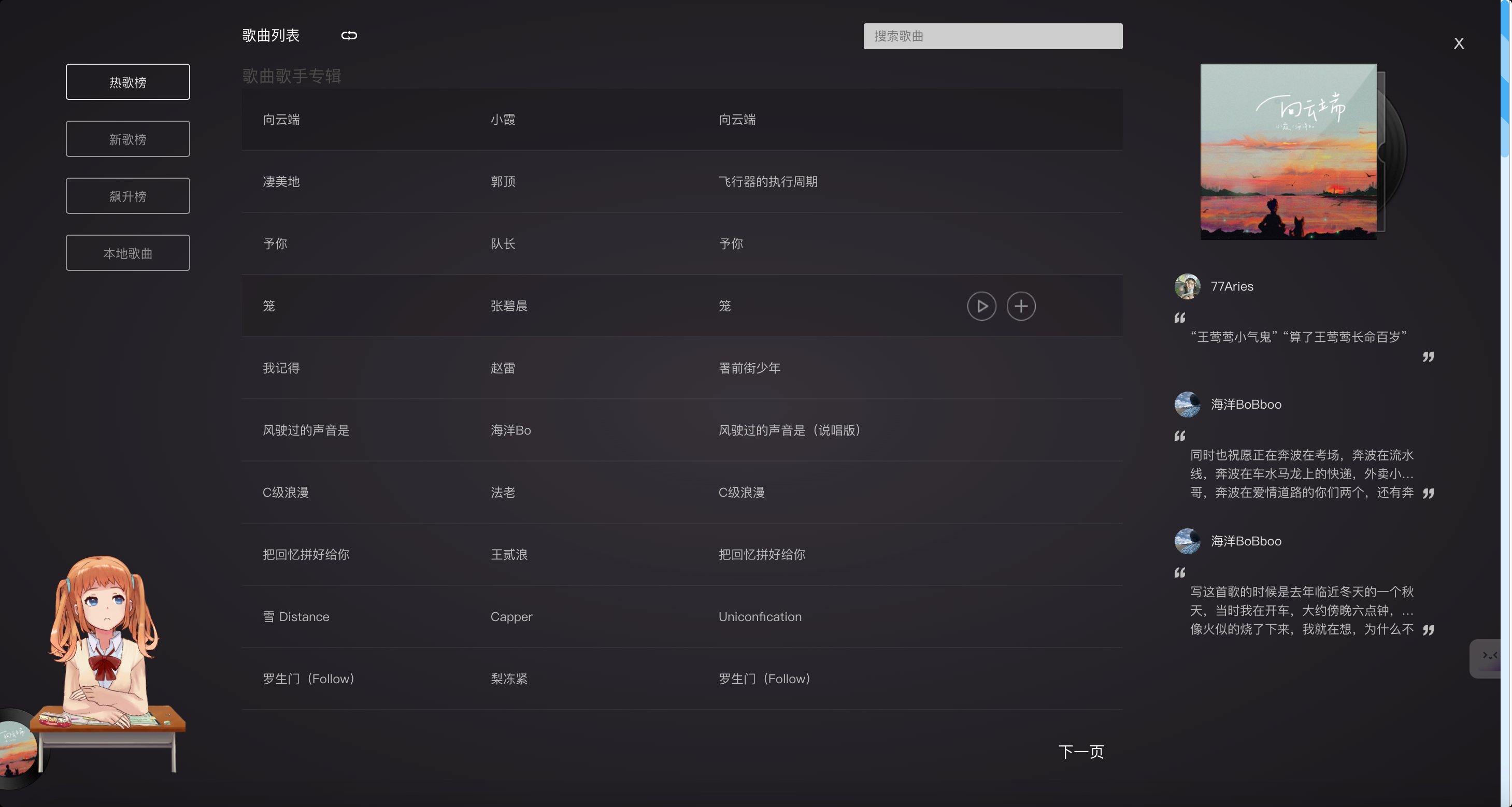
评论
0 条—
还没有评论,来说第一句