配置国内镜像源:解决E: Failed to fetch
本文详细解析了 Ubuntu 更换国内镜像源以解决 `E: Fai
前言
使用 sudo apt get-install 出现 E: Failed to fetch问题。
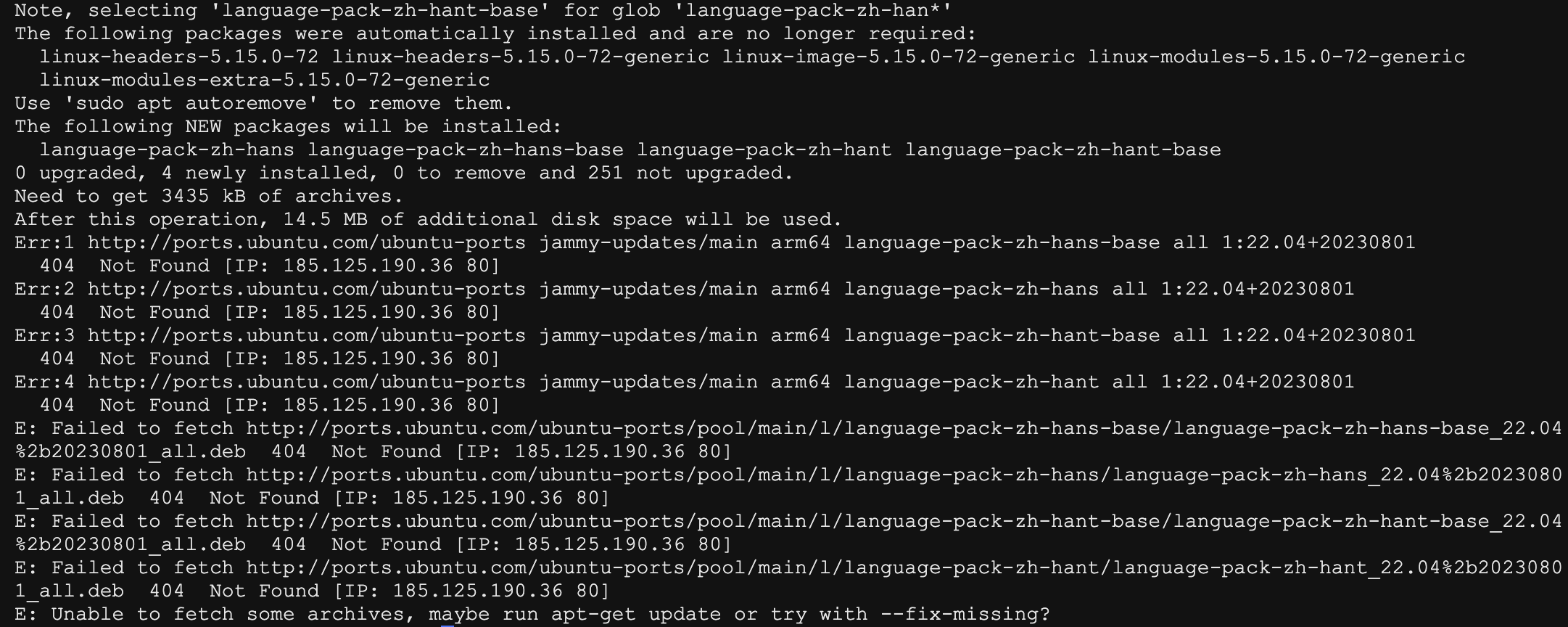
看了下错误应该是下载源的问题。
更换镜像源
使用gedit或vi/vim打开配置文件:
sudo gedit /etc/apt/sources.list
或者
sudo vim /etc/apt/sources.list
在这之前,可以先执行sudo cp /etc/apt/sources.list /etc/apt/sources.list.bak备份源文件,接着将其里边内容全部替换成以下内容:
sh
deb http://mirrors.aliyun.com/ubuntu/ bionic main restricted universe multiverse
deb-src http://mirrors.aliyun.com/ubuntu/ bionic main restricted universe multiverse
deb http://mirrors.aliyun.com/ubuntu/ bionic-security main restricted universe multiverse
deb-src http://mirrors.aliyun.com/ubuntu/ bionic-security main restricted universe multiverse
deb http://mirrors.aliyun.com/ubuntu/ bionic-updates main restricted universe multiverse
deb-src http://mirrors.aliyun.com/ubuntu/ bionic-updates main restricted universe multiverse
deb http://mirrors.aliyun.com/ubuntu/ bionic-proposed main restricted universe multiverse
deb-src http://mirrors.aliyun.com/ubuntu/ bionic-proposed main restricted universe multiverse
deb http://mirrors.aliyun.com/ubuntu/ bionic-backports main restricted universe multiverse
deb-src http://mirrors.aliyun.com/ubuntu/ bionic-backports main restricted universe multiverse之后执行sudo apt update提示: Failed to fetch https://mirrors.aliyun.com/ubuntu/dists/jammy/main/binary-arm64/Packages 404 Not Found [IP: 2409:8c7a:c200:103:3::3df 443]
经排查,原因是我的电脑是arm架构的处理器,而默认匹配都是x86 架构处理器的软件包,故需要将里边的ubuntu全部替换成ubuntu-ports,我这里直接写入并更新。
sh
sudo bash -c "cat << EOF > /etc/apt/sources.list && apt update
deb http://mirrors.aliyun.com/ubuntu-ports/ jammy main restricted universe multiverse
deb-src http://mirrors.aliyun.com/ubuntu-ports/ jammy main restricted universe multiverse
deb http://mirrors.aliyun.com/ubuntu-ports/ jammy-security main restricted universe multiverse
deb-src http://mirrors.aliyun.com/ubuntu-ports/ jammy-security main restricted universe multiverse
deb http://mirrors.aliyun.com/ubuntu-ports/ jammy-updates main restricted universe multiverse
deb-src http://mirrors.aliyun.com/ubuntu-ports/ jammy-updates main restricted universe multiverse
deb http://mirrors.aliyun.com/ubuntu-ports/ jammy-proposed main restricted universe multiverse
deb-src http://mirrors.aliyun.com/ubuntu-ports/ jammy-proposed main restricted universe multiverse
deb http://mirrors.aliyun.com/ubuntu-ports/ jammy-backports main restricted universe multiverse
deb-src http://mirrors.aliyun.com/ubuntu-ports/ jammy-backports main restricted universe multiverse
EOF"
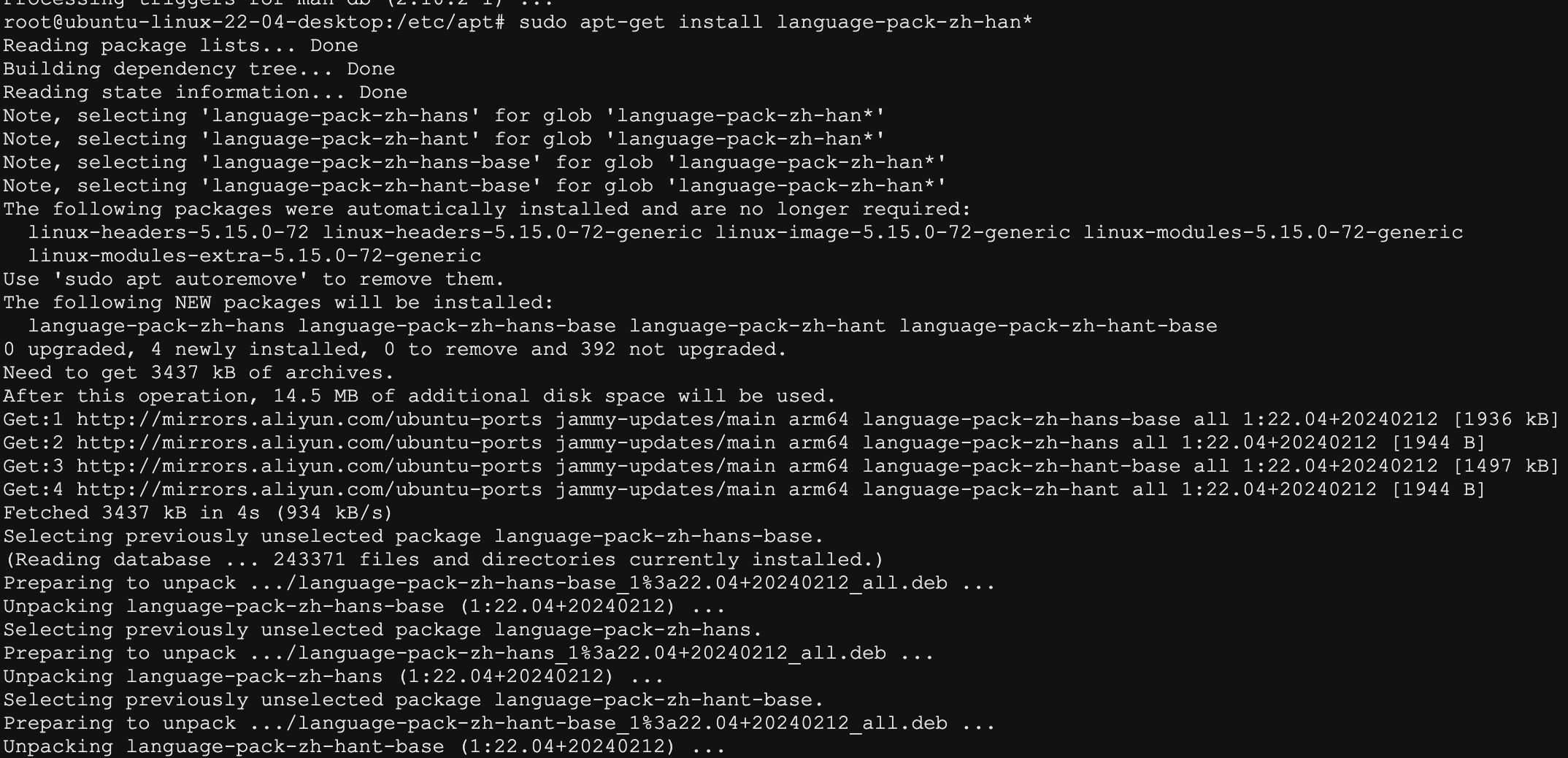
重新更新,可以看到正常执行了。
常用镜像源
国内有很多Ubuntu 22.04的镜像源,包括阿里、网易,还有很多教育网的镜像源,比如清华源、中科大源。
首先我们需要先备份Ubuntu官方的软件源,执行以下命令将备份原来的软件源。
sh
sudo cp /etc/apt/sources.list /etc/apt/sources.list.bak下边命令使用于X86架构处理器,如果是arm架构的,可把下边内容ubuntu全部替换成ubuntu-ports。
阿里云
阿里巴巴开源镜像站,免费提供Linux镜像下载服务,拥有Ubuntu、CentOS、Deepin、MongoDB、Apache、Maven、Composer等多种开源软件镜像源。
此外还提供域名解析DNS、网络授时NTP等服务,致力于为互联网用户提供全面,高效和稳定的基础服务。
复制以下命令即可一键切换到阿里云 ubuntu 22.04镜像:
sh
sudo bash -c "cat << EOF > /etc/apt/sources.list && apt update
deb http://mirrors.aliyun.com/ubuntu/ jammy main restricted universe multiverse
deb-src http://mirrors.aliyun.com/ubuntu/ jammy main restricted universe multiverse
deb http://mirrors.aliyun.com/ubuntu/ jammy-security main restricted universe multiverse
deb-src http://mirrors.aliyun.com/ubuntu/ jammy-security main restricted universe multiverse
deb http://mirrors.aliyun.com/ubuntu/ jammy-updates main restricted universe multiverse
deb-src http://mirrors.aliyun.com/ubuntu/ jammy-updates main restricted universe multiverse
deb http://mirrors.aliyun.com/ubuntu/ jammy-proposed main restricted universe multiverse
deb-src http://mirrors.aliyun.com/ubuntu/ jammy-proposed main restricted universe multiverse
deb http://mirrors.aliyun.com/ubuntu/ jammy-backports main restricted universe multiverse
deb-src http://mirrors.aliyun.com/ubuntu/ jammy-backports main restricted universe multiverse
EOF"
中科大
中国科学技术大学开源软件镜像由中国科学技术大学网络信息中心提供支持。
mirrors.ustc.edu.cn是Debian, Ubuntu, Fedora, Archlinux, CentOS等多个发行版的官方源。目前是中国大陆高校访问量最大,收录最全的开源软件镜像。
中国科学技术大学Linux用户协会是由中国科学技术大学在校的GNU/Linux爱好者发起并组成的一个全校性群众团体。
复制以下命令即可一键切换到中科大ubuntu 22.04镜像:
sh
sudo bash -c "cat << EOF > /etc/apt/sources.list && apt update
deb https://mirrors.ustc.edu.cn/ubuntu/ jammy main restricted universe multiverse
deb-src https://mirrors.ustc.edu.cn/ubuntu/ jammy main restricted universe multiverse
deb https://mirrors.ustc.edu.cn/ubuntu/ jammy-updates main restricted universe multiverse
deb-src https://mirrors.ustc.edu.cn/ubuntu/ jammy-updates main restricted universe multiverse
deb https://mirrors.ustc.edu.cn/ubuntu/ jammy-backports main restricted universe multiverse
deb-src https://mirrors.ustc.edu.cn/ubuntu/ jammy-backports main restricted universe multiverse
deb https://mirrors.ustc.edu.cn/ubuntu/ jammy-security main restricted universe multiverse
deb-src https://mirrors.ustc.edu.cn/ubuntu/ jammy-security main restricted universe multiverse
deb https://mirrors.ustc.edu.cn/ubuntu/ jammy-proposed main restricted universe multiverse
deb-src https://mirrors.ustc.edu.cn/ubuntu/ jammy-proposed main restricted universe multiverse
EOF"
清华
sh
sudo bash -c "cat << EOF > /etc/apt/sources.list && apt update
deb https://mirrors.tuna.tsinghua.edu.cn/ubuntu/ jammy main restricted universe multiverse
# deb-src https://mirrors.tuna.tsinghua.edu.cn/ubuntu/ jammy main restricted universe multiverse
deb https://mirrors.tuna.tsinghua.edu.cn/ubuntu/ jammy-updates main restricted universe multiverse
# deb-src https://mirrors.tuna.tsinghua.edu.cn/ubuntu/ jammy-updates main restricted universe multiverse
deb https://mirrors.tuna.tsinghua.edu.cn/ubuntu/ jammy-backports main restricted universe multiverse
# deb-src https://mirrors.tuna.tsinghua.edu.cn/ubuntu/ jammy-backports main restricted universe multiverse
deb https://mirrors.tuna.tsinghua.edu.cn/ubuntu/ jammy-security main restricted universe multiverse
# deb-src https://mirrors.tuna.tsinghua.edu.cn/ubuntu/ jammy-security main restricted universe multiverse
EOF"