解决异常:踩坑小程序之自定义tabbar切换图标bug
AI 摘要鱼粮不足,AI 今天先歇着 · 正文在下面
前言
今天使用自定义tabbar时,发现点击tabbar,但对应的图标并没有正确显示,而是“错位”了
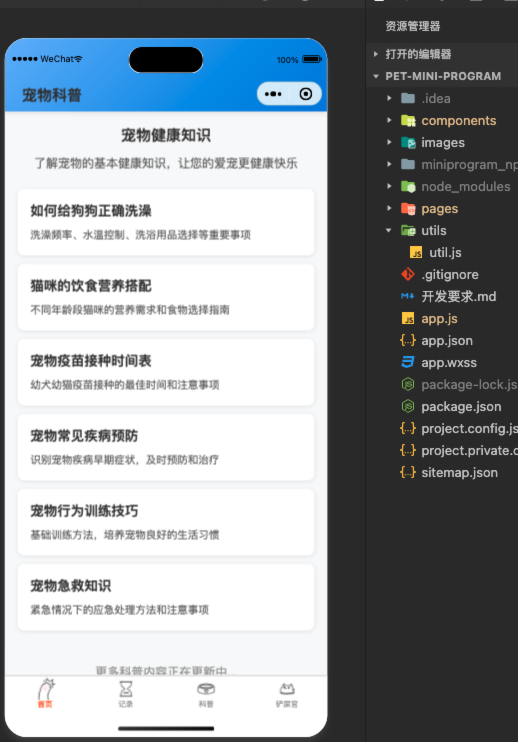
解决
需要在每一个关联tabbar的页面的js文件中添加下面的代码:
js
    pageLifetimes: {
        show() {
            if (typeof this.getTabBar === 'function' &&
                this.getTabBar()) {
                this.getTabBar().setData({
                    selected: 1 ## 依据当前页面的下标决定
                })
            }
        }
    },
这样就能解决啦
附录
自定义tabbar组件代码
index.wxml
html
<!--miniprogram/custom-tab-bar/index.wxml-->
<view class="tab-bar">
    <view class="tab-bar-border"></view>
    <view wx:for="{{list}}" wx:key="index" class="tab-bar-item {{activeIdx === index ? 'active' : ''}}" data-path="{{item.pagePath}}" data-index="{{index}}"
          bindtap="switchTab">
        <image src="{{activeIdx === index ? item.selectedIconPath : item.iconPath}}"></image>
        <view style="color: {{activeIdx === index ? selectedColor : color}}">{{item.text}}</view>
    </view>
</view>
index.js
js
Component({
    data: {
        activeIdx: 0,
        color: "#999999",
        selectedColor: "#ff6b35",
        list: [{
            pagePath: "/pages/home/home",
            iconPath: "/images/home.png",
            selectedIconPath: "/images/home-s.png",
            text: "首页"
        }, {
            pagePath: "/pages/record/record",
            iconPath: "/images/record.png",
            selectedIconPath: "/images/record-s.png",
            text: "记录"
        }, {
            pagePath: "/pages/kepu/kepu",
            iconPath: "/images/kepu.png",
            selectedIconPath: "/images/kepu-s.png",
            text: "科普"
        }, {
            pagePath: "/pages/person/person",
            iconPath: "/images/person.png",
            selectedIconPath: "/images/person-s.png",
            text: "我的"
        }]
    },
    pageLifetimes: {
        show() {
            this.updateActiveIdx();
        }
    },
    attached() {
        this.updateActiveIdx();
    },
    methods: {
        updateActiveIdx() {
            const pages = getCurrentPages();
            const currentPage = pages[pages.length - 1];
            const currentPath = '/' + currentPage.route;

            const idx = this.data.list.findIndex(item => item.pagePath === currentPath);
            if (idx !== -1) {
                this.setData({activeIdx: idx});
            }
        },
        switchTab(e) {
            const index = e.currentTarget.dataset.index;
            wx.switchTab({
                url: this.data.list[index].pagePath
            });
        }
    }
})index.wxss
css
.tab-bar {
    position: fixed;
    bottom: 0;
    left: 0;
    right: 0;
    height: 48px;
    background: white;
    display: flex;
    padding-bottom: env(safe-area-inset-bottom);
    z-index: 1000;
    border-top: 1px solid #e5e5e5;
}

.tab-bar-border {
    background-color: rgba(0, 0, 0, 0.33);
    position: absolute;
    left: 0;
    top: 0;
    width: 100%;
    height: 1px;
    transform: scaleY(0.5);
}

.tab-bar-item {
    flex: 1;
    text-align: center;
    display: flex;
    justify-content: center;
    align-items: center;
    flex-direction: column;
    transition: transform 0.2s ease;
}

.tab-bar-item.active {
    animation: bounce 0.3s ease;
}

.tab-bar-item image {
    width: 27px;
    height: 27px;
    transition: transform 0.2s ease;
}

.tab-bar-item.active image {
    transform: scale(1.1);
}

.tab-bar-item view {
    font-size: 10px;
    transition: all 0.2s ease;
}

.tab-bar-item.active view {
    font-weight: bold;
}

@keyframes bounce {
    0% {
        transform: scale(1);
    }
    50% {
        transform: scale(1.1);
    }
    100% {
        transform: scale(1);
    }
}index.json
json
{
  "component": true
}评论
0 条—
还没有评论,来说第一句