分享几款比较好玩的背景特效
AI 摘要鱼粮不足,AI 今天先歇着 · 正文在下面
教程
粒子吸附背景,效果图

particle.js
js
!function () {
    //封装方法,压缩之后减少文件大小
    function get_attribute(node, attr, default_value) {
        return node.getAttribute(attr) || default_value;
    }

    //封装方法,压缩之后减少文件大小
    function get_by_tagname(name) {
        return document.getElementsByTagName(name);
    }

    //获取配置参数
    function get_config_option() {
        var scripts = get_by_tagname("script"),
            script_len = scripts.length,
            script = scripts[script_len - 1]; //当前加载的script
        return {
            l: script_len, //长度,用于生成id用
            z: get_attribute(script, "zIndex", -1), //z-index
            o: get_attribute(script, "opacity", 0.8), //opacity
            c: get_attribute(script, "color", "255,255,255"), //color
            n: get_attribute(script, "count", 350) //count
        };
    }

    //设置canvas的高宽
    function set_canvas_size() {
        canvas_width = the_canvas.width = window.innerWidth || document.documentElement.clientWidth || document.body.clientWidth,
            canvas_height = the_canvas.height = window.innerHeight || document.documentElement.clientHeight || document.body.clientHeight;
    }

    //绘制过程
    function draw_canvas() {
        context.clearRect(0, 0, canvas_width, canvas_height);
        //随机的线条和当前位置联合数组
        var e, i, d, x_dist, y_dist, dist; //临时节点
        //遍历处理每一个点
        random_points.forEach(function (r, idx) {
            r.x += r.xa,
                r.y += r.ya, //移动
                r.xa *= r.x > canvas_width || r.x < 0 ? -1 : 1,
                r.ya *= r.y > canvas_height || r.y < 0 ? -1 : 1, //碰到边界,反向反弹
                context.fillRect(r.x - 0.5, r.y - 0.5, 1, 1); //绘制一个宽高为1的点
            //从下一个点开始
            for (i = idx + 1; i < all_array.length; i++) {
                e = all_array[i];
                // 当前点存在
                if (null !== e.x && null !== e.y) {
                    x_dist = r.x - e.x; //x轴距离 l
                    y_dist = r.y - e.y; //y轴距离 n
                    dist = x_dist * x_dist + y_dist * y_dist; //总距离, m

                    dist < e.max && (e === current_point && dist >= e.max / 2 && (r.x -= 0.03 * x_dist, r.y -= 0.03 * y_dist), //靠近的时候加速
                        d = (e.max - dist) / e.max,
                        context.beginPath(),
                        context.lineWidth = d / 2,
                        context.strokeStyle = "#000000",
                        context.moveTo(r.x, r.y),
                        context.lineTo(e.x, e.y),
                        context.stroke());
                }
            }
        }), frame_func(draw_canvas);
    }

    //创建画布,并添加到body中
    var the_canvas = document.createElement("canvas"), //画布
        config = get_config_option(), //配置
        canvas_id = "c_n" + config.l, //canvas id
        context = the_canvas.getContext("2d"), canvas_width, canvas_height,
        frame_func = window.requestAnimationFrame || window.webkitRequestAnimationFrame || window.mozRequestAnimationFrame || window.oRequestAnimationFrame || window.msRequestAnimationFrame || function (func) {
            window.setTimeout(func, 1000 / 40);
        }, random = Math.random,
        current_point = {
            x: null, //当前鼠标x
            y: null, //当前鼠标y
            max: 20000 // 圈半径的平方
        },
        all_array;
    the_canvas.id = canvas_id;
    the_canvas.style.cssText = "position:fixed;top:0;left:0;z-index:" + config.z + ";opacity:" + config.o;
    get_by_tagname("body")[0].appendChild(the_canvas);

    //初始化画布大小
    set_canvas_size();
    window.onresize = set_canvas_size;
    //当时鼠标位置存储,离开的时候,释放当前位置信息
    window.onmousemove = function (e) {
        e = e || window.event;
        current_point.x = e.clientX;
        current_point.y = e.clientY;
    }, window.onmouseout = function () {
        current_point.x = null;
        current_point.y = null;
    };
    //随机生成config.n条线位置信息
    for (var random_points = [], i = 0; config.n > i; i++) {
        var x = random() * canvas_width, //随机位置
            y = random() * canvas_height,
            xa = 2 * random() - 1, //随机运动方向
            ya = 2 * random() - 1;
        // 随机点
        random_points.push({
            x: x,
            y: y,
            xa: xa,
            ya: ya,
            max: 6000 //沾附距离
        });
    }
    all_array = random_points.concat([current_point]);
    //0.1秒后绘制
    setTimeout(function () {
        draw_canvas();
    }, 100);
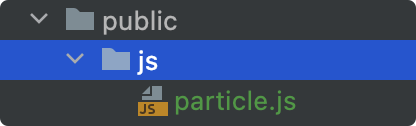
}();像我是在vue项目中使用的,可以放在public下,如图:
在index中引入
js
<!-- 粒子吸附 -->
<script type="text/javascript" src="js/particle.js" charset="utf-8" defer></script>
附加
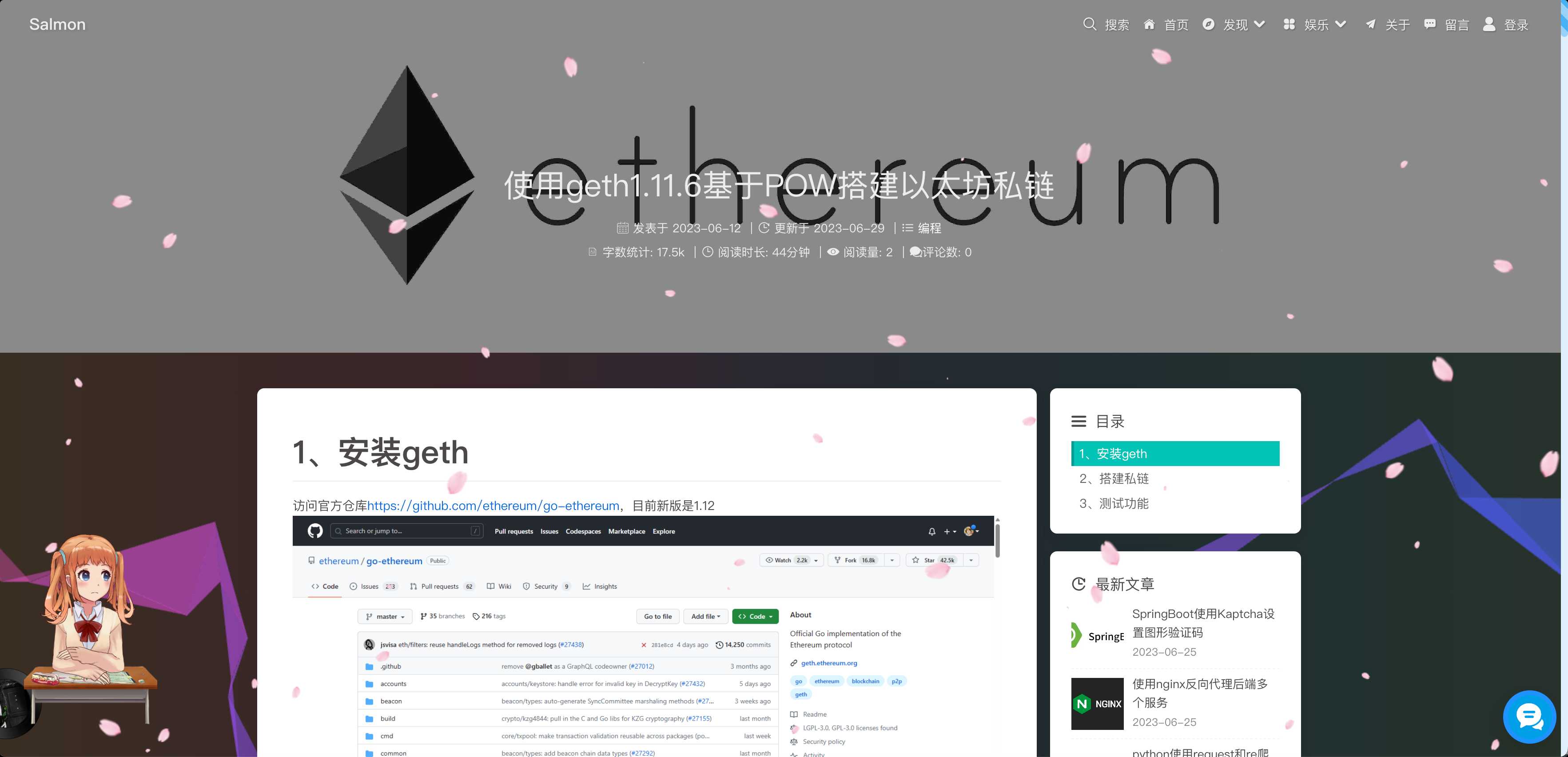
彩带背景,效果图
ribbon.js
js
(function (name, factory) {
    if (typeof window === "object") {
        window[name] = factory();
    }
})("Ribbons", function () {
    var _w = window, _b = document.body, _d = document.documentElement;
    var random = function () {
        if (arguments.length === 1) {
            if (Array.isArray(arguments[0])) {
                var index = Math.round(random(0, arguments[0].length - 1));
                return arguments[0][index];
            }
            return random(0, arguments[0]);
        } else if (arguments.length === 2) {
            return Math.random() * (arguments[1] - arguments[0]) + arguments[0];
        }
        return 0;
    };
    var screenInfo = function (e) {
        var width = Math.max(0, _w.innerWidth || _d.clientWidth || _b.clientWidth || 0),
            height = Math.max(0, _w.innerHeight || _d.clientHeight || _b.clientHeight || 0),
            scrollx = Math.max(0, _w.pageXOffset || _d.scrollLeft || _b.scrollLeft || 0) - (_d.clientLeft || 0),
            scrolly = Math.max(0, _w.pageYOffset || _d.scrollTop || _b.scrollTop || 0) - (_d.clientTop || 0);
        return {
            width: width,
            height: height,
            ratio: width / height,
            centerx: width / 2,
            centery: height / 2,
            scrollx: scrollx,
            scrolly: scrolly
        };
    };
    var mouseInfo = function (e) {
        var screen = screenInfo(e), mousex = e ? Math.max(0, e.pageX || e.clientX || 0) : 0,
            mousey = e ? Math.max(0, e.pageY || e.clientY || 0) : 0;
        return {
            mousex: mousex,
            mousey: mousey,
            centerx: mousex - screen.width / 2,
            centery: mousey - screen.height / 2
        };
    };
    var Point = function (x, y) {
        this.x = 0;
        this.y = 0;
        this.set(x, y);
    };
    Point.prototype = {
        constructor: Point, set: function (x, y) {
            this.x = x || 0;
            this.y = y || 0;
        }, copy: function (point) {
            this.x = point.x || 0;
            this.y = point.y || 0;
            return this;
        }, multiply: function (x, y) {
            this.x *= x || 1;
            this.y *= y || 1;
            return this;
        }, divide: function (x, y) {
            this.x /= x || 1;
            this.y /= y || 1;
            return this;
        }, add: function (x, y) {
            this.x += x || 0;
            this.y += y || 0;
            return this;
        }, subtract: function (x, y) {
            this.x -= x || 0;
            this.y -= y || 0;
            return this;
        }, clampX: function (min, max) {
            this.x = Math.max(min, Math.min(this.x, max));
            return this;
        }, clampY: function (min, max) {
            this.y = Math.max(min, Math.min(this.y, max));
            return this;
        }, flipX: function () {
            this.x *= -1;
            return this;
        }, flipY: function () {
            this.y *= -1;
            return this;
        }
    };
    var Factory = function (options) {
        this._canvas = null;
        this._context = null;
        this._sto = null;
        this._width = 0;
        this._height = 0;
        this._scroll = 0;
        this._ribbons = [];
        this._options = {
            colorSaturation: "80%",
            colorBrightness: "60%",
            colorAlpha: 0.65,
            colorCycleSpeed: 6,
            verticalPosition: "center",
            horizontalSpeed: 200,
            ribbonCount: 4,
            strokeSize: 0,
            parallaxAmount: -0.5,
            animateSections: true
        };
        this._onDraw = this._onDraw.bind(this);
        this._onResize = this._onResize.bind(this);
        this._onScroll = this._onScroll.bind(this);
        this.setOptions(options);
        this.init();
    };
    Factory.prototype = {
        constructor: Factory, setOptions: function (options) {
            if (typeof options === "object") {
                for (var key in options) {
                    if (options.hasOwnProperty(key)) {
                        this._options[key] = options[key];
                    }
                }
            }
        }, init: function () {
            try {
                this._canvas = document.createElement("canvas");
                this._canvas.style["display"] = "block";
                this._canvas.style["position"] = "fixed";
                this._canvas.style["margin"] = "0";
                this._canvas.style["padding"] = "0";
                this._canvas.style["border"] = "0";
                this._canvas.style["outline"] = "0";
                this._canvas.style["left"] = "0";
                this._canvas.style["top"] = "0";
                this._canvas.style["width"] = "100%";
                this._canvas.style["height"] = "100%";
                this._canvas.style["z-index"] = "-1";
                this._canvas.style["background-color"] = "#1f1f1f";
                this._canvas.id = "bgCanvas";
                this._onResize();
                this._context = this._canvas.getContext("2d");
                this._context.clearRect(0, 0, this._width, this._height);
                this._context.globalAlpha = this._options.colorAlpha;
                // 这里可以设置是否随着窗口的滚动而滚动
                window.addEventListener("resize", this._onResize);
                window.addEventListener("scroll", this._onScroll);
                // 这里设置添加的位置
                var body_ = document.getElementsByTagName('body')[0];
                body_.appendChild(this._canvas);
            } catch (e) {
                console.warn("Canvas Context Error: " + e.toString());
                return;
            }
            this._onDraw();
        }, addRibbon: function () {
            var dir = Math.round(random(1, 9)) > 5 ? "right" : "left", stop = 1000, hide = 200, min = 0 - hide,
                max = this._width + hide, movex = 0, movey = 0, startx = dir === "right" ? min : max,
                starty = Math.round(random(0, this._height));
            if (/^(top|min)$/i.test(this._options.verticalPosition)) {
                starty = 0 + hide;
            } else if (/^(middle|center)$/i.test(this._options.verticalPosition)) {
                starty = this._height / 2;
            } else if (/^(bottom|max)$/i.test(this._options.verticalPosition)) {
                starty = this._height - hide;
            }
            var ribbon = [], point1 = new Point(startx, starty), point2 = new Point(startx, starty), point3 = null,
                color = Math.round(random(0, 360)), delay = 0;
            while (true) {
                if (stop <= 0) break;
                stop--;
                movex = Math.round((Math.random() * 1 - 0.2) * this._options.horizontalSpeed);
                movey = Math.round((Math.random() * 1 - 0.5) * (this._height * 0.25));
                point3 = new Point();
                point3.copy(point2);
                if (dir === "right") {
                    point3.add(movex, movey);
                    if (point2.x >= max) break;
                } else if (dir === "left") {
                    point3.subtract(movex, movey);
                    if (point2.x <= min) break;
                }
                ribbon.push({
                    point1: new Point(point1.x, point1.y),
                    point2: new Point(point2.x, point2.y),
                    point3: point3,
                    color: color,
                    delay: delay,
                    dir: dir,
                    alpha: 0,
                    phase: 0
                });
                point1.copy(point2);
                point2.copy(point3);
                delay += 4;
                color += this._options.colorCycleSpeed;
            }
            this._ribbons.push(ribbon);
        }, _drawRibbonSection: function (section) {
            if (section) {
                if (section.phase >= 1 && section.alpha <= 0) {
                    return true;
                }
                if (section.delay <= 0) {
                    section.phase += 0.02;
                    section.alpha = Math.sin(section.phase) * 1;
                    section.alpha = section.alpha <= 0 ? 0 : section.alpha;
                    section.alpha = section.alpha >= 1 ? 1 : section.alpha;
                    if (this._options.animateSections) {
                        var mod = Math.sin(1 + section.phase * Math.PI / 2) * 0.1;
                        if (section.dir === "right") {
                            section.point1.add(mod, 0);
                            section.point2.add(mod, 0);
                            section.point3.add(mod, 0);
                        } else {
                            section.point1.subtract(mod, 0);
                            section.point2.subtract(mod, 0);
                            section.point3.subtract(mod, 0);
                        }
                        section.point1.add(0, mod);
                        section.point2.add(0, mod);
                        section.point3.add(0, mod);
                    }
                } else {
                    section.delay -= 0.5;
                }
                var s = this._options.colorSaturation, l = this._options.colorBrightness,
                    c = "hsla(" + section.color + ", " + s + ", " + l + ", " + section.alpha + " )";
                this._context.save();
                if (this._options.parallaxAmount !== 0) {
                    this._context.translate(0, this._scroll * this._options.parallaxAmount);
                }
                this._context.beginPath();
                this._context.moveTo(section.point1.x, section.point1.y);
                this._context.lineTo(section.point2.x, section.point2.y);
                this._context.lineTo(section.point3.x, section.point3.y);
                this._context.fillStyle = c;
                this._context.fill();
                if (this._options.strokeSize > 0) {
                    this._context.lineWidth = this._options.strokeSize;
                    this._context.strokeStyle = c;
                    this._context.lineCap = "round";
                    this._context.stroke();
                }
                this._context.restore();
            }
            return false;
        }, _onDraw: function () {
            for (var i = 0, t = this._ribbons.length; i < t; ++i) {
                if (!this._ribbons[i]) {
                    this._ribbons.splice(i, 1);
                }
            }
            this._context.clearRect(0, 0, this._width, this._height);
            for (var a = 0; a < this._ribbons.length; ++a) {
                var ribbon = this._ribbons[a], numSections = ribbon.length, numDone = 0;
                for (var b = 0; b < numSections; ++b) {
                    if (this._drawRibbonSection(ribbon[b])) {
                        numDone++;
                    }
                }
                if (numDone >= numSections) {
                    this._ribbons[a] = null;
                }
            }
            if (this._ribbons.length < this._options.ribbonCount) {
                this.addRibbon();
            }
            requestAnimationFrame(this._onDraw);
        }, _onResize: function (e) {
            var screen = screenInfo(e);
            this._width = screen.width;
            this._height = screen.height;
            if (this._canvas) {
                this._canvas.width = this._width;
                this._canvas.height = this._height;
                if (this._context) {
                    this._context.globalAlpha = this._options.colorAlpha;
                }
            }
        }, _onScroll: function (e) {
            var screen = screenInfo(e);
            this._scroll = screen.scrolly;
        }
    };
    return Factory;
});
new Ribbons();评论
0 条—
还没有评论,来说第一句