使用 HTTP 请求发送阿里云短信
AI 摘要salmon-ai
本文讲解了如何在不引入阿里云官方 SDK 的情况下,直接通过 HTTP 请求调
前言
最近,华为云短信服务停止了维护,故需要替换云厂商,经过评估,决定采用阿里云短信服务。
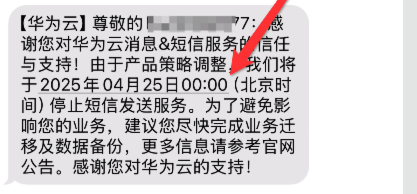
由于该项目老旧,之前并未引入官方 SDK,而是通过手动封装 HTTP 请求进行调用。因此,这里我也就不引入官方 SDK 了,直接使用 HTTP 请求来实现短信发送。
参考文档:
- https://developer.aliyun.com/article/252987
- https://api.aliyun.com/document/Dysmsapi/2017-05-25/SendSms
- https://help.aliyun.com/document_detail/434764.html?spm=a2c4g.11186623.0.0.6c1a461694cIjE
- https://help.aliyun.com/zh/sdk/product-overview/v3-request-structure-and-signature?spm=a2c4g.11186623.0.0.2a5574b8WRn9cI#title-h9n-xj6-ue8
代码
为了提高可扩展性,我对短信发送逻辑进行了一层抽象,所有短信发送请求都通过一个 统一接口 进行处理,并使用 策略模式 选择具体实现。
java
/**
 * 短信服务
 *
 * @author Salmon
 * @since 2025-04-02 09:22
 */
public interface MultiChannelMailService{

    Map<String, String> send(String sender, String receiver, String templateId, String templateParas, String statusCallBack, String signature, String appKey, String appSecret, String url) throws KeyStoreException, NoSuchAlgorithmException, KeyManagementException, IOException;
}
使用阿里云短信实现
java
package yhsp.inner.sms.impl;

import cn.hutool.json.JSON;
import cn.hutool.json.JSONUtil;
import org.apache.http.client.methods.CloseableHttpResponse;
import org.apache.http.client.methods.HttpPost;
import org.apache.http.entity.StringEntity;
import org.apache.http.impl.client.CloseableHttpClient;
import org.apache.http.impl.client.HttpClients;
import org.apache.http.util.EntityUtils;
import yhsp.inner.sms.mservice.MultiChannelMailService;

import javax.crypto.Mac;
import javax.crypto.spec.SecretKeySpec;
import java.io.IOException;
import java.net.URLEncoder;
import java.nio.charset.StandardCharsets;
import java.security.KeyManagementException;
import java.security.KeyStoreException;
import java.security.NoSuchAlgorithmException;
import java.text.SimpleDateFormat;
import java.util.*;

/**
 * 阿里云短信实现
 *
 * @author Salmon
 * @since 2025-04-02 09:22
 */
public class AliYunSender implements MultiChannelMailService {

    private static final AliYunSender ALI_YUN_SENDER = new AliYunSender();

    private AliYunSender() {
    }

    public static AliYunSender getInstance() {
        return ALI_YUN_SENDER;
    }

    public static void main(String[] args) throws KeyStoreException, NoSuchAlgorithmException, IOException, KeyManagementException {
        MultiChannelMailService service = new AliYunSender();
        service.send("", "接收人手机号", "模板 ID", "", "", "xxxx", "ak", "as", "https://dysmsapi.aliyuncs.com");
    }

    @Override
    public Map<String, String> send(String sender, String receiver, String templateId, String templateParams, String statusCallBack, String signature, String appKey, String appSecret, String url) throws KeyStoreException, NoSuchAlgorithmException, KeyManagementException, IOException {
        try {
            Map<String, String> respMap = new HashMap<>();

            // 1. 生成 API 请求参数
            Map<String, String> params = new HashMap<>();
            params.put("RegionId", "cn-shenzhen");
            params.put("Action", "SendSms");
            params.put("Version", "2017-05-25");
            params.put("AccessKeyId", appKey);
            params.put("Timestamp", getUtcTime());
            params.put("SignatureMethod", "HMAC-SHA1");
            params.put("SignatureVersion", "1.0");
            params.put("SignatureNonce", UUID.randomUUID().toString());
            params.put("PhoneNumbers", receiver);
            params.put("SignName", signature);
            params.put("TemplateCode", templateId);
            params.put("TemplateParam", templateParams);
            params.put("Format", "Json");

            // 2. 生成签名
            String signatureString = sign(params, appSecret);
            params.put("Signature", signatureString);

            // 3. 发送 HTTP 请求
            String response = sendHttpRequest(url, params);

            // 4. 解析返回结果
            System.out.println(response);
            JSON resultJson;
            try {
                resultJson = JSONUtil.parse(response);
            } catch (Exception e) {
                respMap.put("status", "0");
                respMap.put("msg", "发送消息返回数据解析失败,请咨询管理员");
                return respMap;
            }
            // 非发送成功
            if (!"OK".equals(resultJson.getByPath("Code"))) {
                respMap.put("status", "0");
                respMap.put("msg", "异常状态码【" + resultJson.getByPath("Code") + "】,详情:" + resultJson.getByPath("Message") + ",ak:" + appKey + ",sk:" + appSecret+",url:"+url);
                return respMap;
            }
            respMap.put("status", "1");
            respMap.put("msg", "成功发送");
            return respMap;
        } catch (Exception e) {
            log.error("阿里云短信发送失败", e);
            throw new RuntimeException(e);
        }
    }

    private String sign(Map<String, String> params, String appSecret) throws Exception {
        List<String> sortedKeys = new ArrayList<>(params.keySet());
        Collections.sort(sortedKeys);
        StringBuilder canonicalizedQueryString = new StringBuilder();
        for (String key : sortedKeys) {
            canonicalizedQueryString.append("&")
                    .append(percentEncode(key))
                    .append("=")
                    .append(percentEncode(params.get(key)));
        }
        String stringToSign = "POST&%2F&" + percentEncode(canonicalizedQueryString.substring(1));
        Mac mac = Mac.getInstance("HmacSHA1");
        mac.init(new SecretKeySpec((appSecret + "&").getBytes(StandardCharsets.UTF_8), "HmacSHA1"));
        byte[] signData = mac.doFinal(stringToSign.getBytes(StandardCharsets.UTF_8));
        return Base64.getEncoder().encodeToString(signData);
    }

    private String sendHttpRequest(String url, Map<String, String> params) throws Exception {
        StringBuilder postData = new StringBuilder();
        List<String> sortedKeys = new ArrayList<>(params.keySet());
        Collections.sort(sortedKeys);
        for (String key : sortedKeys) {
            postData.append("&")
                    .append(percentEncode(key))
                    .append("=")
                    .append(percentEncode(params.get(key)));
        }
        HttpPost post = new HttpPost(url);
        post.setHeader("Content-Type", "application/x-www-form-urlencoded");
        post.setEntity(new StringEntity(postData.substring(1)));

        try (CloseableHttpClient client = HttpClients.createDefault();
             CloseableHttpResponse response = client.execute(post)) {
            return EntityUtils.toString(response.getEntity());
        }
    }

    // 注意:此方法用于符合阿里云标准的编码方式
    private String percentEncode(String value) throws Exception {
        return URLEncoder.encode(value, "UTF-8")
                .replace("+", "%20")
                .replace("*", "%2A")
                .replace("%7E", "~");
    }

    private String getUtcTime() {
        SimpleDateFormat sdf = new SimpleDateFormat("yyyy-MM-dd'T'HH:mm:ss'Z'");
        sdf.setTimeZone(TimeZone.getTimeZone("UTC"));
        return sdf.format(new Date());
    }
}测试
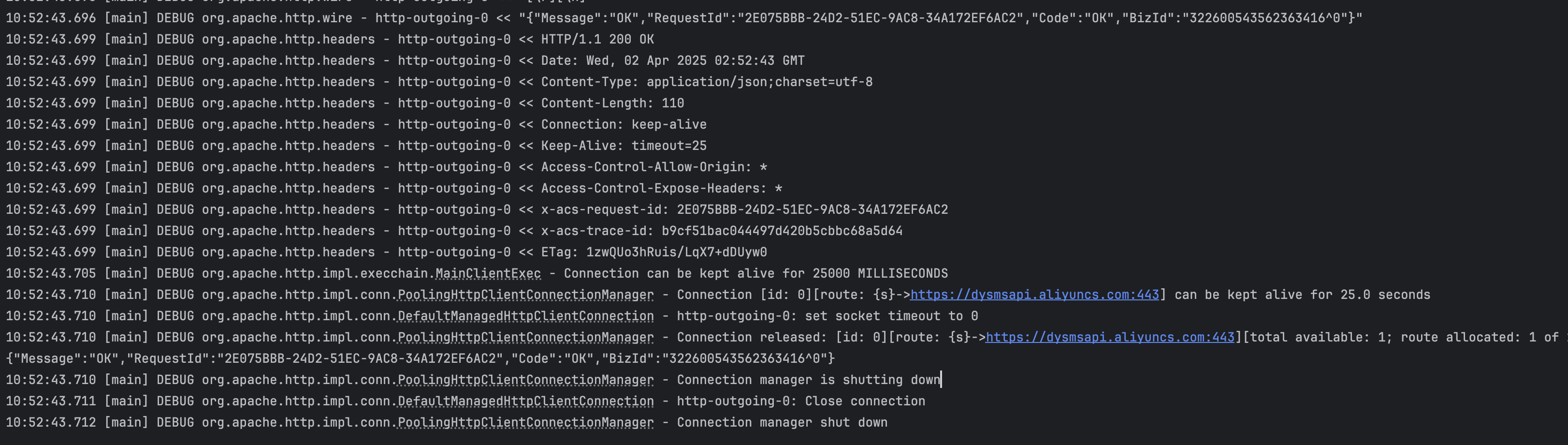
可以看到发送成功啦
评论
0 条—
还没有评论,来说第一句